
The first time a client asked me how can i sell on wordpress without woocommerce, I assumed they were trying to dodge the WooCommerce learning curve. They were not. They sold three digital prints a month, hated bloated admin screens, and wanted exactly one Stripe button on a sales page. WooCommerce was overkill. After 8 years building WordPress stores for paying clients, I have lost count of the people who installed WooCommerce, watched it add dozens of database tables, and wished they had not. So when somebody asks me how can i sell on wordpress without woocommerce, the honest answer in 2026 is “yes, three real paths, each one fits a specific store shape.” This post walks through them with real numbers, not affiliate links.
Most “how can i sell on wordpress without woocommerce” guides online are SaaS landing pages disguised as tutorials. The next ~1,800 words are not.
How Can I Sell on WordPress Without WooCommerce? The Direct Answer
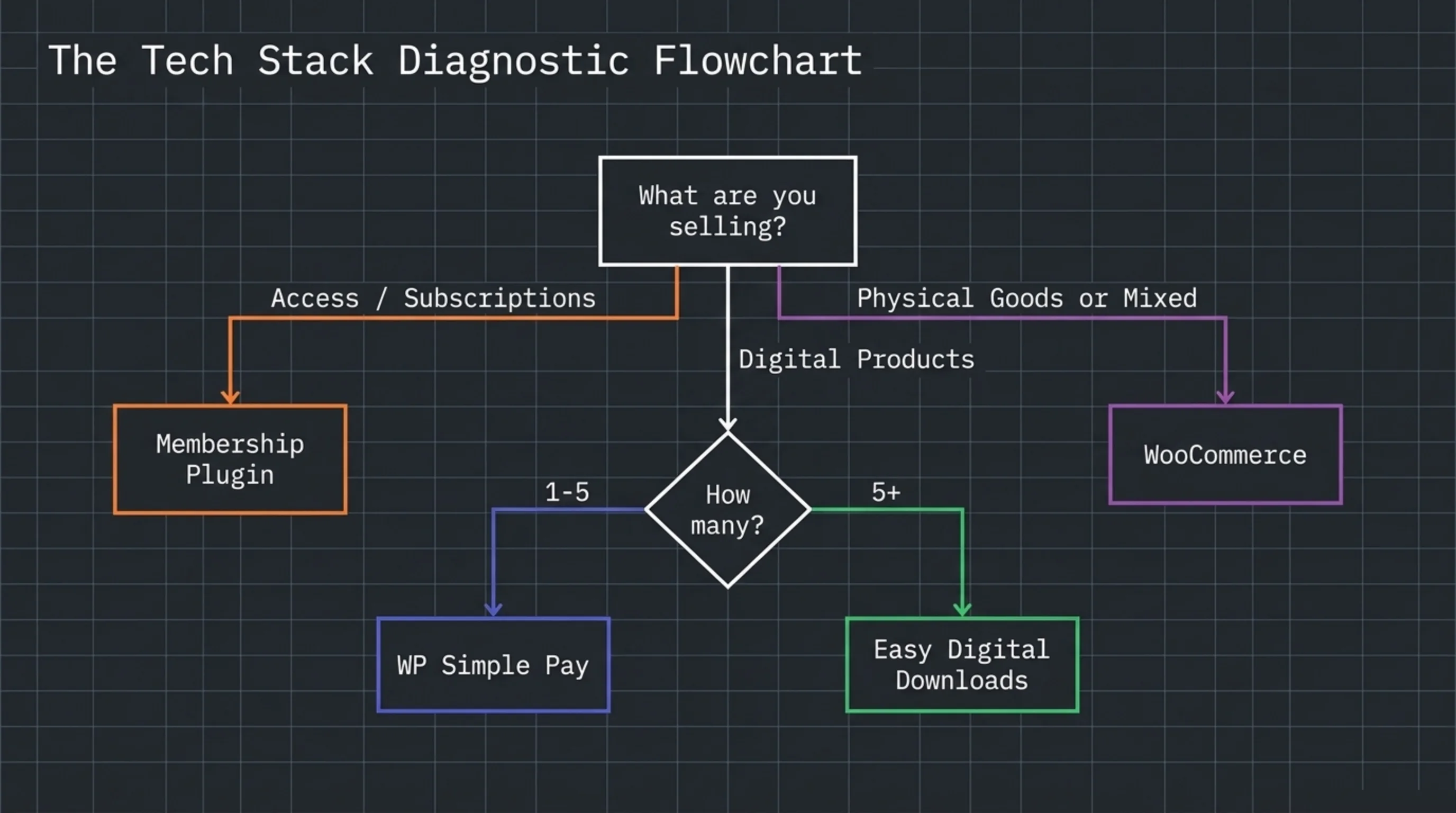
Yes. You can sell on a WordPress site without ever touching the WooCommerce plugin. Three production-tested paths for how to sell on wordpress without woocommerce exist, and the right one depends on what you sell and how often.
- Stripe payment buttons via WP Simple Pay for one or two products, mostly digital, low order volume.
- Easy Digital Downloads for digital-only catalogs (ebooks, software licenses, music, design assets).
- A membership/subscription plugin like MemberPress or Restrict Content Pro for paid content access.
Each one lives in the official directory at wordpress.org/plugins. None of them require WooCommerce. None will install WooCommerce as a hidden dependency. So the first practical answer to how can i sell on wordpress without woocommerce is: pick one of the three above and skip WooCommerce entirely.
A pet peeve before I keep going. Every “WordPress alternatives to WooCommerce” listicle online ranks plugins by affiliate payout, not by what works in production. I have shipped client revenue on all three of the categories above, plus tested ShopWP, Shopkeeper, and a homegrown Stripe Checkout integration. The list above is the order I actually recommend after billing real hours against each one.
What Is the Difference Between WordPress and WooCommerce, Practically?
The terminology trips up nine clients out of ten. WordPress is the content management system, the engine that runs your site, your pages, your blog, your media library. WooCommerce is a plugin you install on top of WordPress to add cart, checkout, products, taxes, shipping, and order management. They are not the same thing.
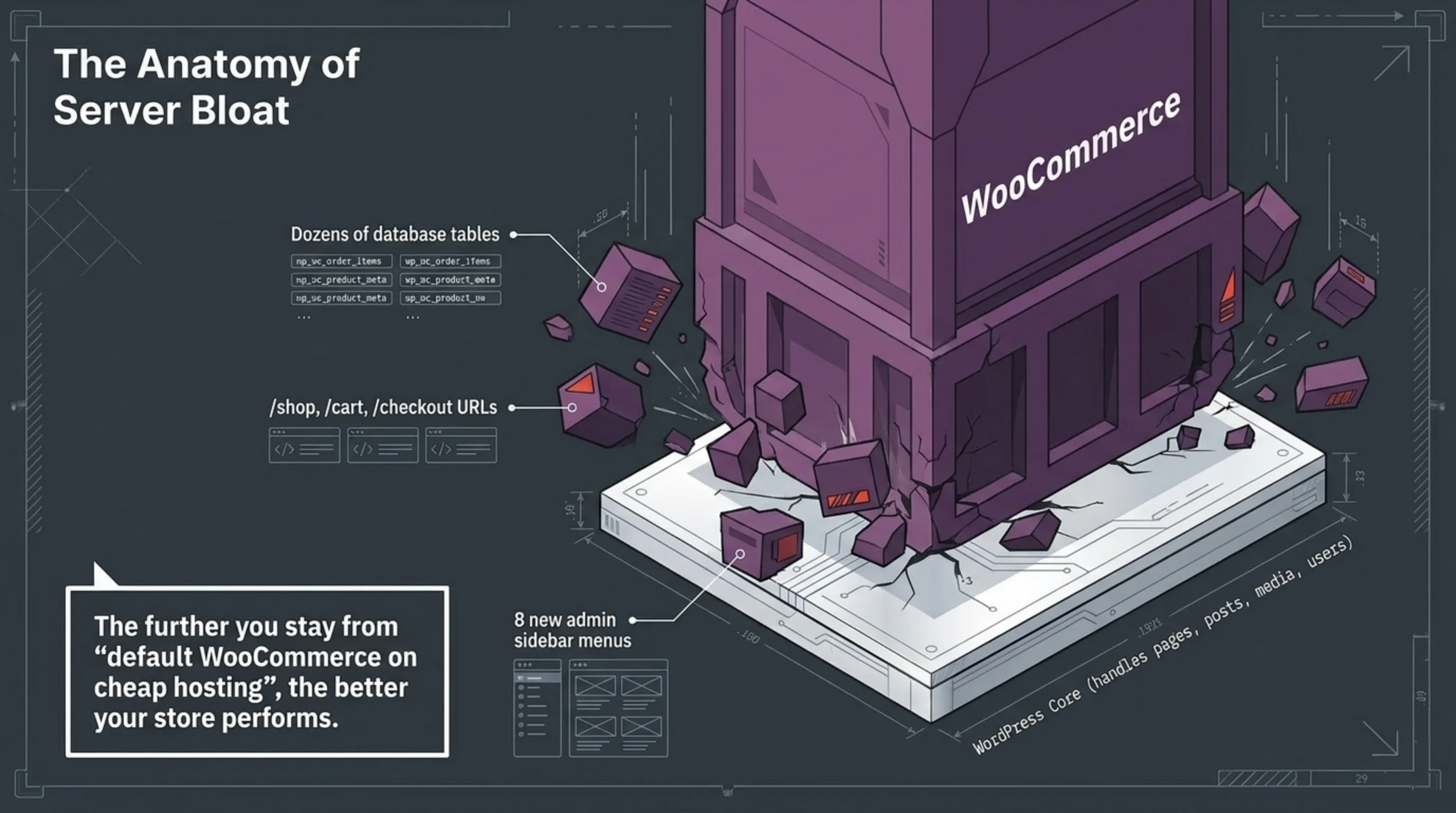
So what is the difference between wordpress and woocommerce in operational terms? WordPress alone gives you pages, posts, media, users, and a comment system. Add WooCommerce and you get dozens of new database tables, the /shop, /cart, /checkout, and /my-account URLs, and an admin sidebar that grows by 8 menu items. If you are not selling 50+ SKUs with shipping zones and tax classes, those tables and menus are dead weight on your server.
That weight is the entire reason the question how can i sell on wordpress without woocommerce keeps surfacing. WordPress on its own is fast. WooCommerce on a shared host with 200 products and the wrong cron setup is not. The further you stay from “default WooCommerce on cheap hosting”, the better your store performs, and the gap between WordPress core and WooCommerce decides where you start.
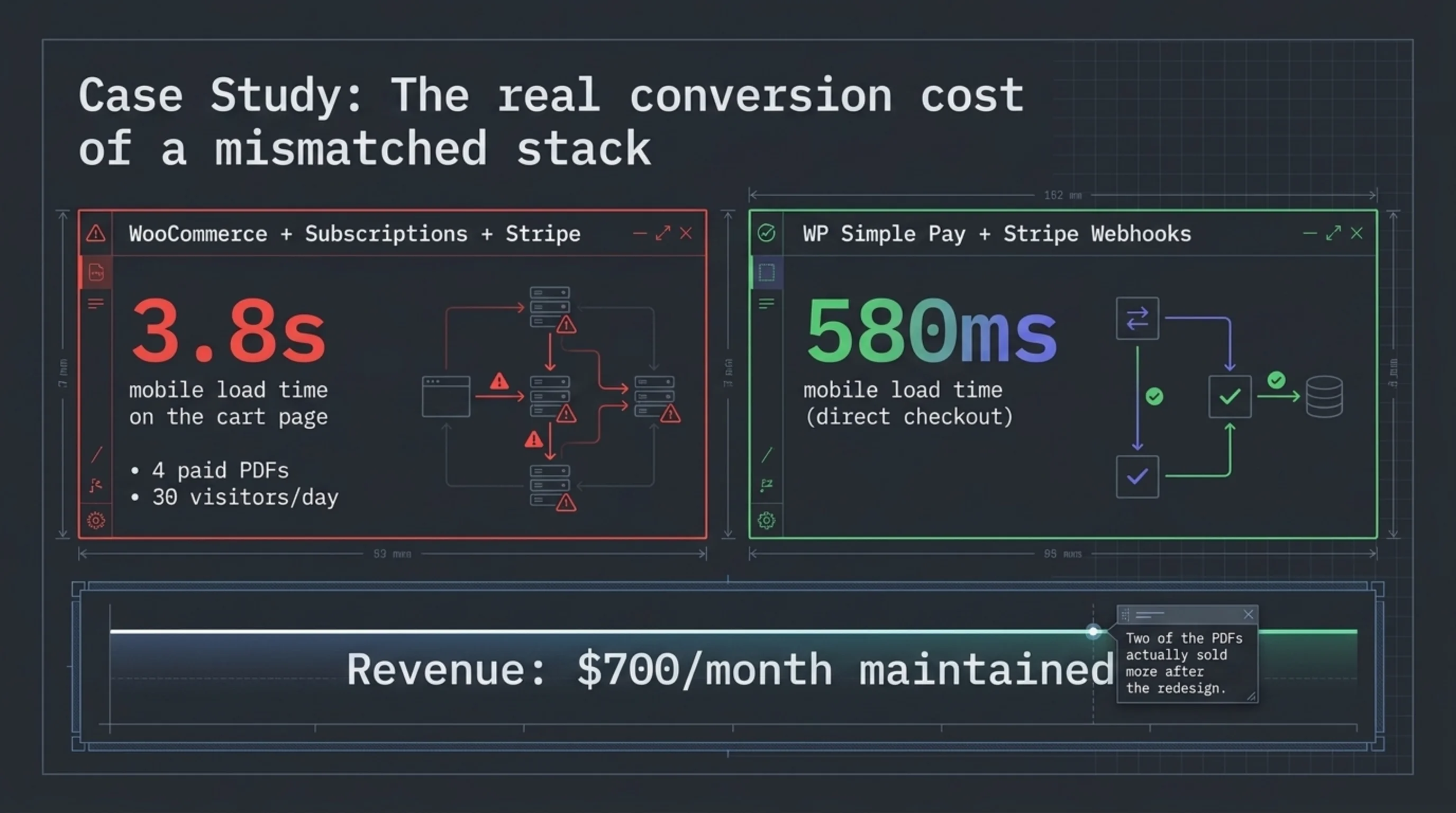
A war story to anchor this. Audited a meditation app’s WordPress site in November 2025: 4 paid PDFs, 30 visitors a day, $700/month in revenue. Whoever set it up had installed WooCommerce, WooCommerce Subscriptions, and Stripe for WooCommerce. The cart page took 3.8 seconds to load on mobile. We replaced the entire stack with WP Simple Pay free, four buttons on a single sales page, and a Stripe webhook listener for receipts. Page load dropped to 580ms. Same revenue the next month, two of the four PDFs sold more after the redesign. That is the difference between wordpress and woocommerce in real conversion terms.
The Three Real Ways to Sell on WordPress Without WooCommerce
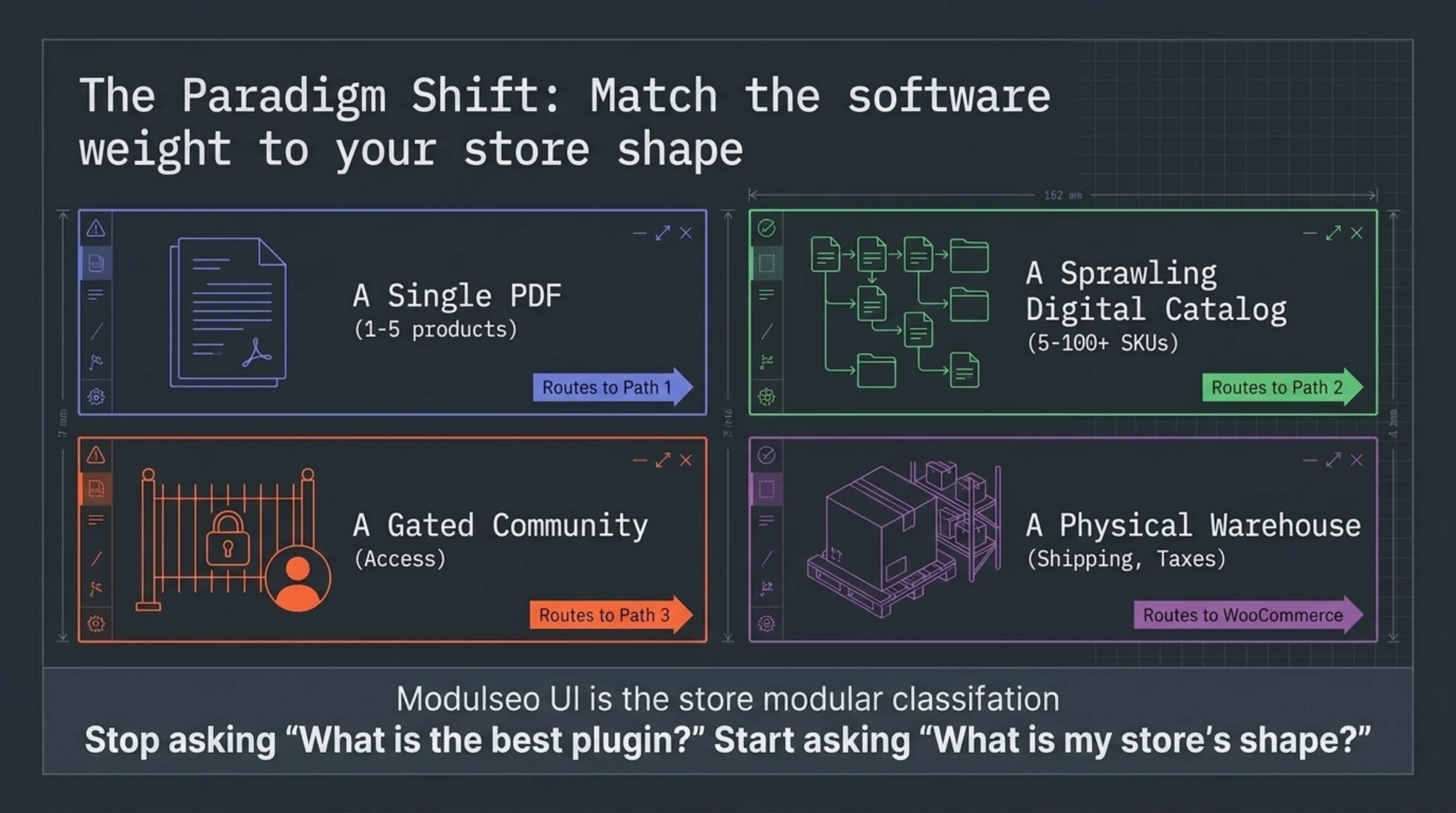
Here is the procedure I run when a client asks how can i sell on wordpress without woocommerce and I need to actually decide which of the three paths to pick.
Path 1: How to Sell on WordPress Without WooCommerce With WP Simple Pay
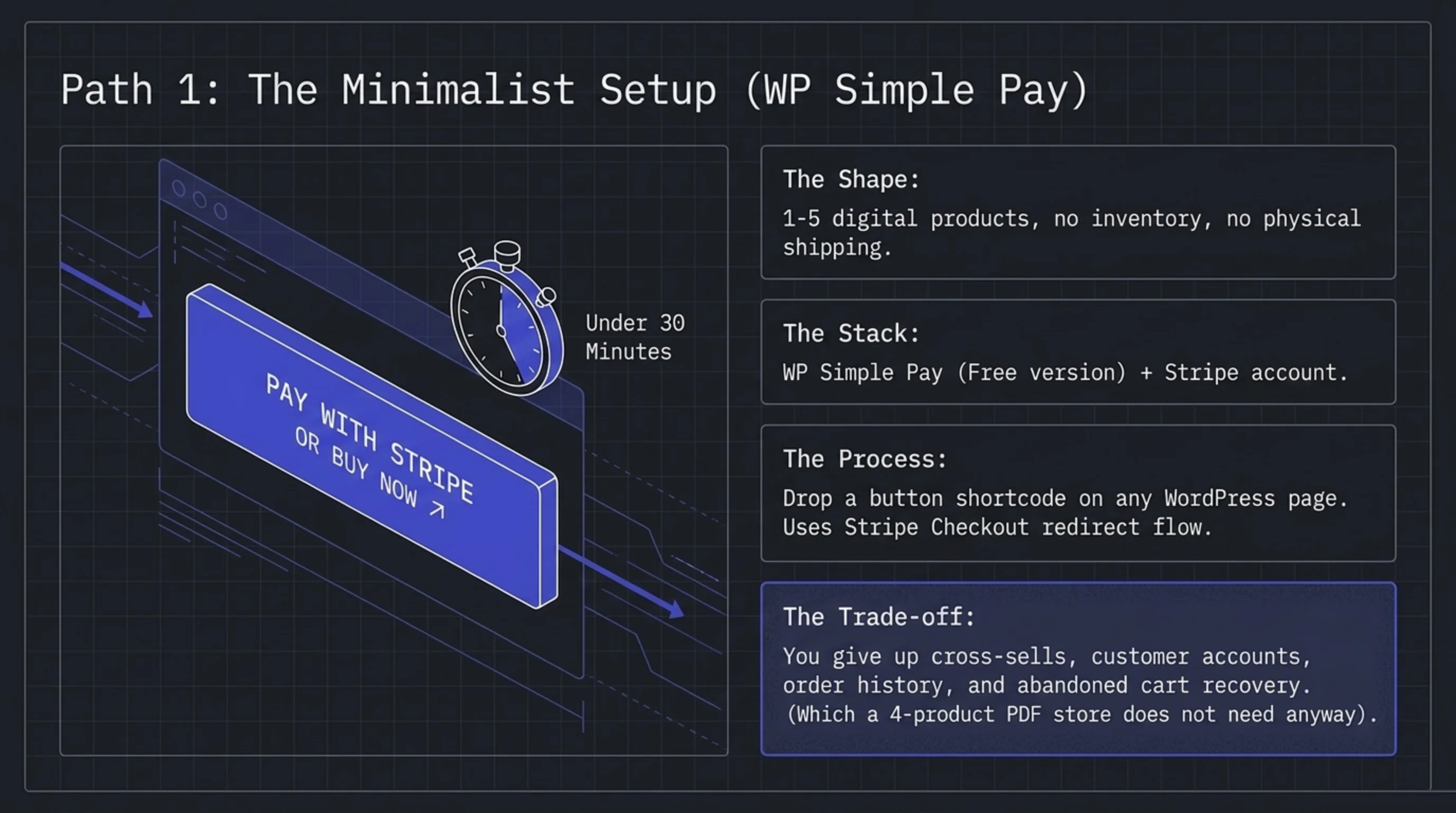
For 1-5 digital products, no inventory, no shipping. Install WP Simple Pay (the free version handles single-payment buttons), connect a Stripe account, drop a button shortcode on any WordPress page. Total setup time: under 30 minutes if your Stripe account already exists. Read stripe.com/docs/payments/checkout once for the redirect flow and you are done.
What you give up: cross-sells, customer accounts, an order history page, abandoned cart recovery. None of which a 4-product PDF store needs.
Path 2: Easy Digital Downloads (EDD) for a Real Catalog
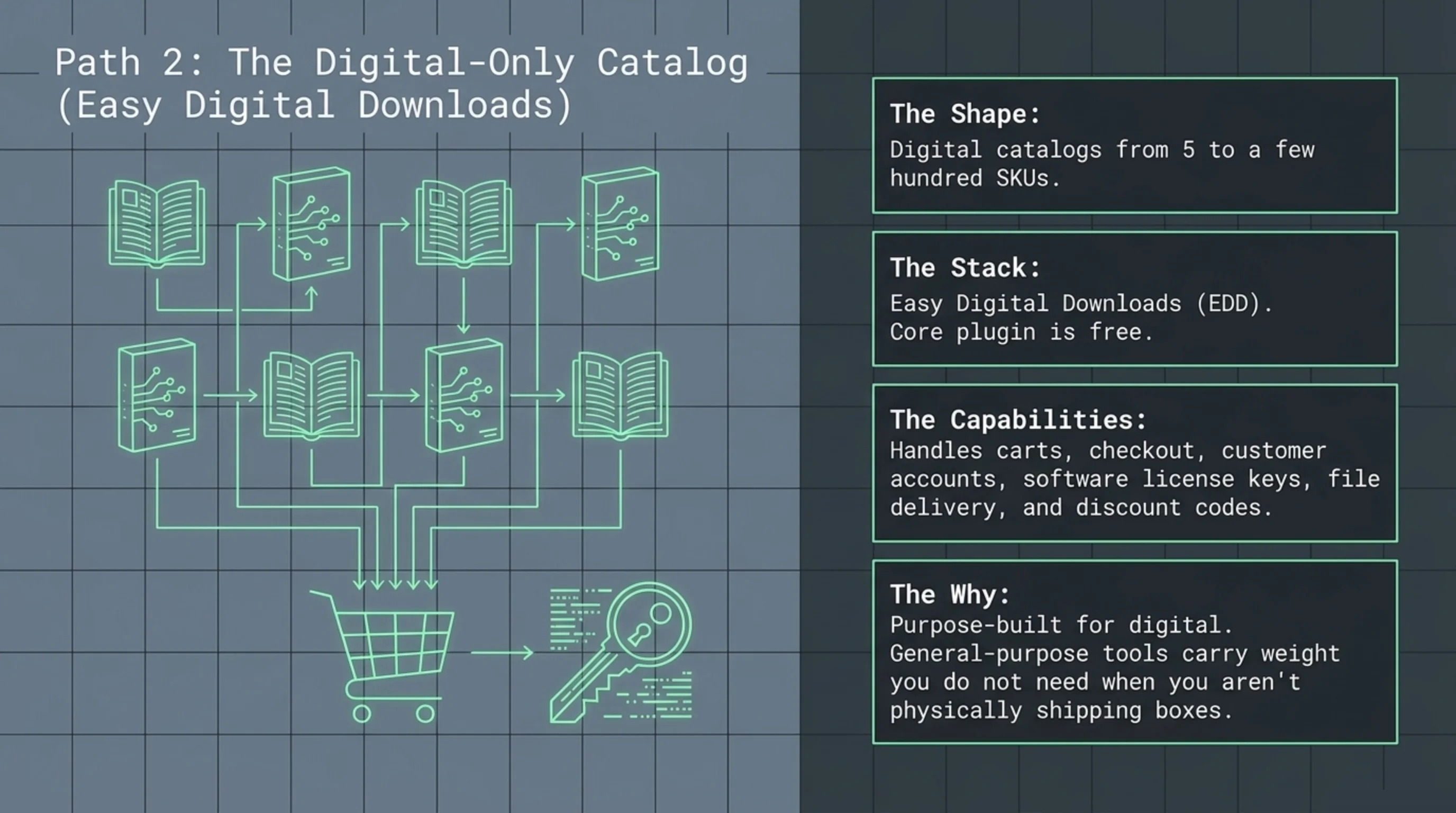
For digital catalogs of 5 to a few hundred SKUs. Easy Digital Downloads is the plugin I install on every digital-only store I build. It does carts, checkout, customer accounts, license keys for software, file delivery, and discount codes. The core plugin is free in the directory; the team at easydigitaldownloads.com sells extensions for recurring billing and software licensing on top.
EDD is what I tell people to use when they ask how can i sell on wordpress without woocommerce and they have more than three products. It is purpose-built for digital. WooCommerce is general-purpose and carries weight you do not need on a digital-only store.
Path 3: Sell on WordPress Without WooCommerce With a Membership Plugin
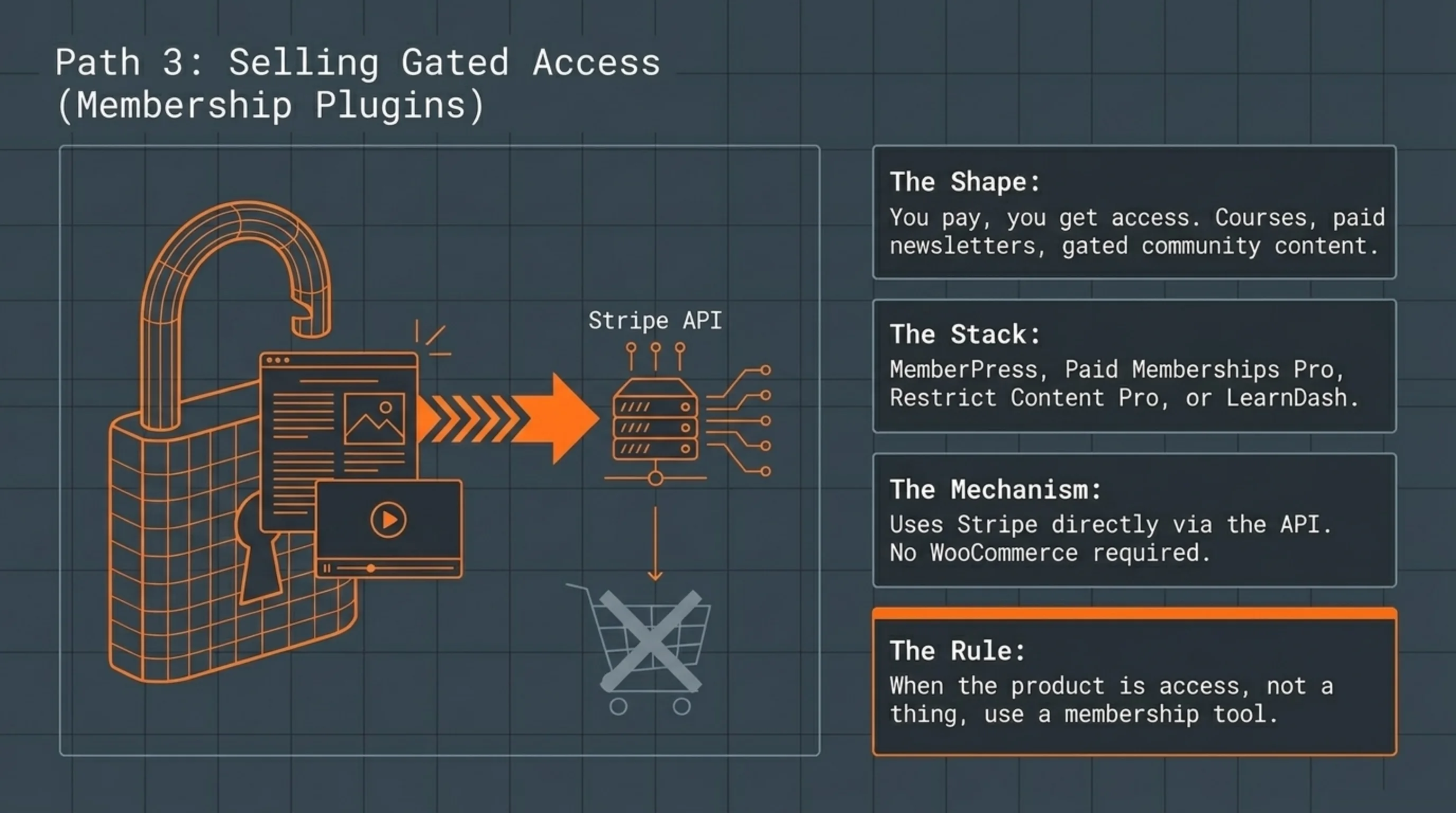
For “you pay, you get access to gated content”. MemberPress, Paid Memberships Pro, Restrict Content Pro, LearnDash. None of these need WooCommerce. They use Stripe directly via the Stripe API. If you sell courses, paid newsletters, or community access, this is the right shape, and the answer to how can i sell on wordpress without woocommerce when the product is access, not a thing.
Comparison Table: Costs and Capabilities
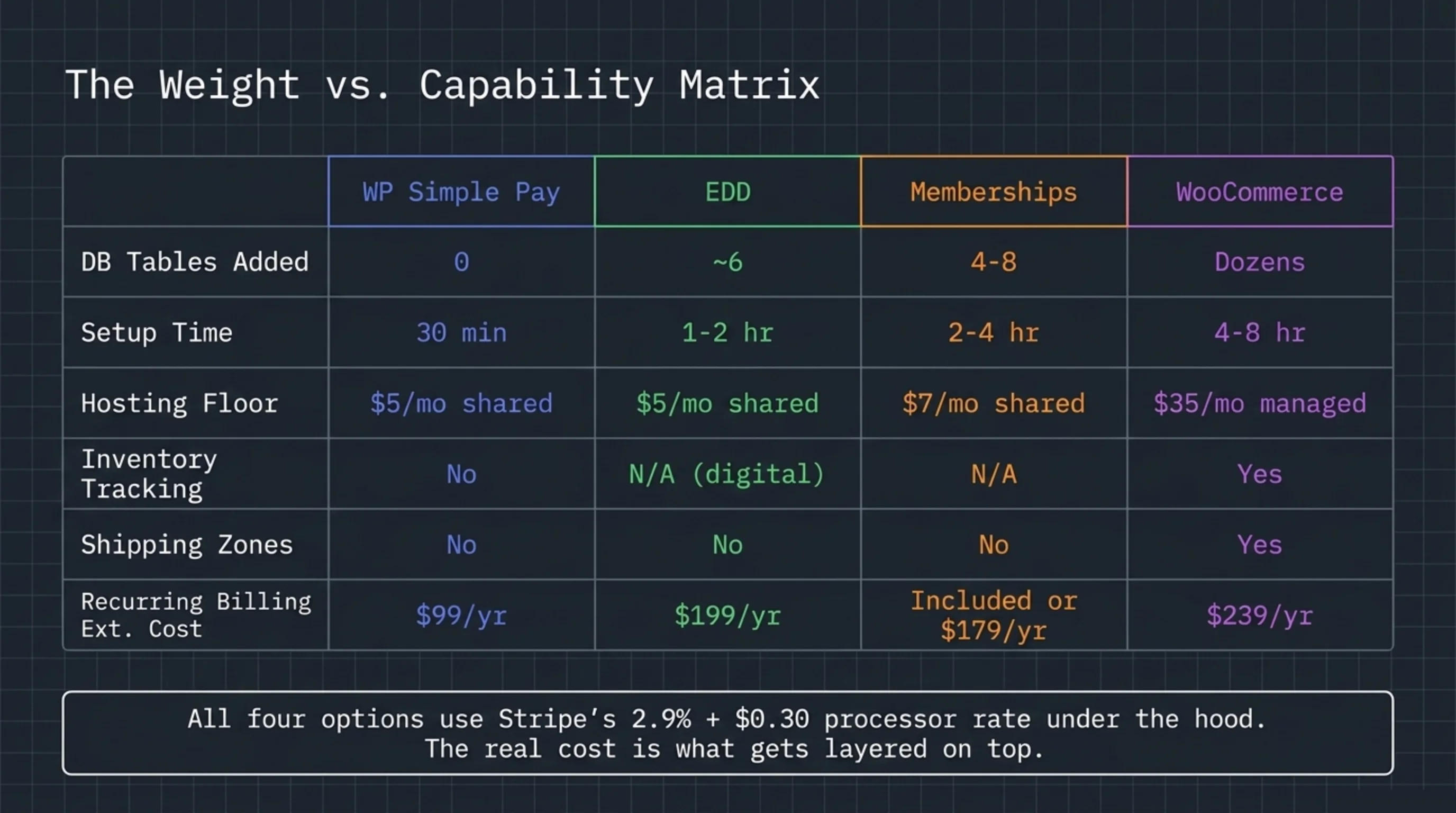
This table is the practical answer to what is the difference between wordpress and woocommerce when you put dollars next to each option.
| Capability | WP Simple Pay | EDD | Membership | WooCommerce |
|---|---|---|---|---|
| Free core | yes | yes | partial | yes |
| Best for | 1-5 products | digital catalog | paid access | physical, mixed |
| Inventory tracking | no | n/a (digital) | n/a | yes |
| Shipping zones | no | no | no | yes |
| Recurring billing | $99/yr Pro | $199/yr extension | included or $179/yr | $239/yr extension |
| DB tables added | 0 | ~6 | 4-8 | dozens |
| Setup time | 30 min | 1-2 hr | 2-4 hr | 4-8 hr |
| Hosting floor | shared $5/mo | shared $5/mo | shared $7/mo | managed $35/mo |
Pull current pricing yourself before committing. WooCommerce Subscriptions is documented at woocommerce.com/products/woocommerce-subscriptions, and Stripe’s processing fees of 2.9% + $0.30 per US card transaction sit at stripe.com/pricing. All four options use Stripe under the hood at the same processor rate; the difference is what gets layered on top of that rate, and how many database tables get added to your WordPress install along the way.
Why Use WooCommerce Instead, Then?
Now the contrarian section. After spending 1,000 words on the lightweight alternatives, I will tell you when not to take that route. Why use WooCommerce specifically?
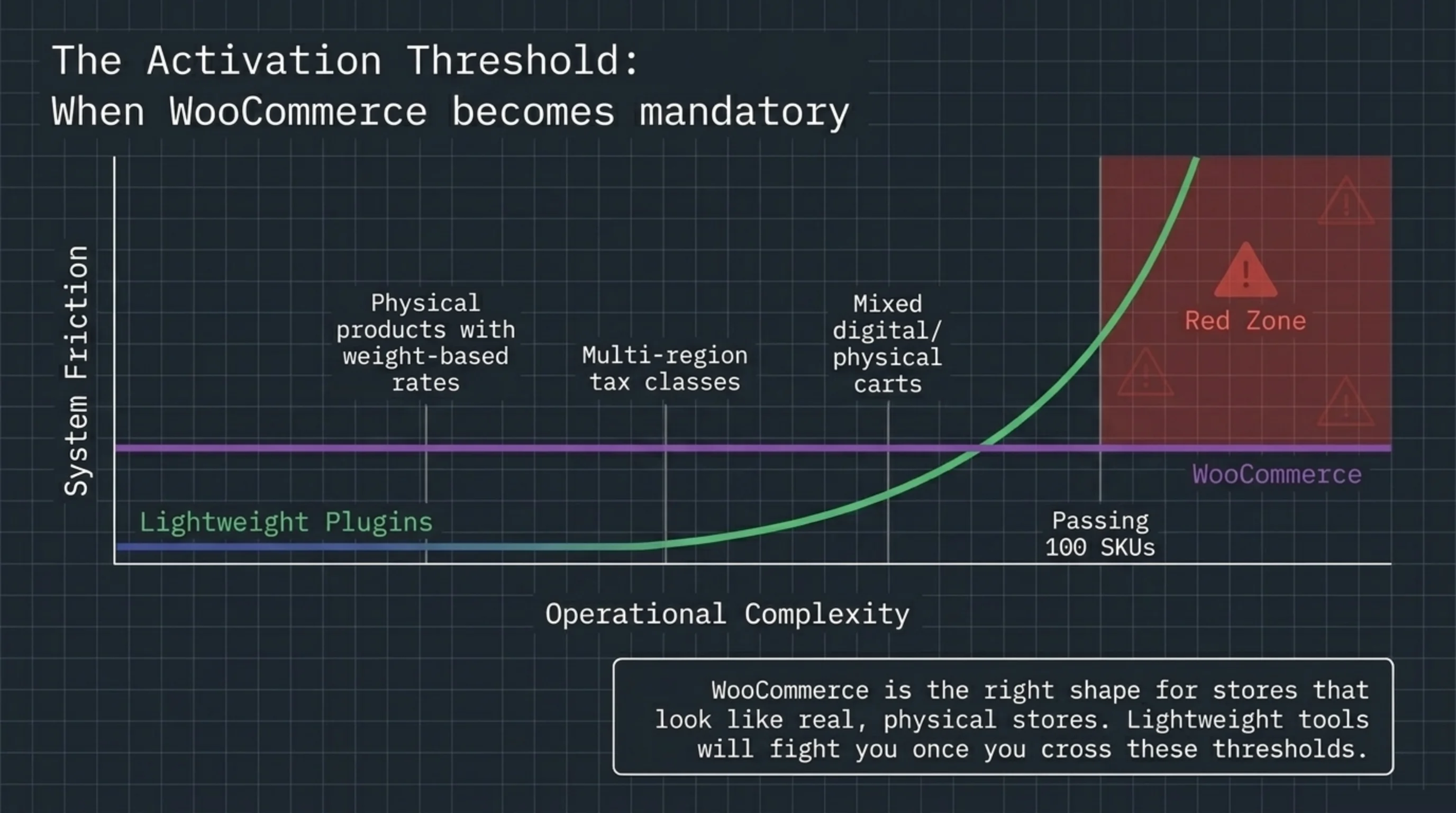
- You sell physical products with shipping zones, weight-based rates, or multi-region tax classes.
- You need a real cart with cross-sells, related products, and customer accounts that survive five years of orders.
- Your catalog will pass 100 SKUs within a year.
- You sell mixed digital and physical in one cart.
- You need integrations with shipping, accounting, or ERP systems that already speak WooCommerce as a first-class citizen.
The WooCommerce extension catalog at woocommerce.com has hundreds of paid and free integrations, a decade of developer Stack Overflow answers, and every host on the planet has tuned for it. The lightweight alternatives have not.
When you do go WooCommerce, the admin gets cluttered fast. Products, orders, coupons, reports, marketing, plus whatever your 30 plugins each add to the sidebar. I install BrikPanel on every WooCommerce store now and use the role-based menu hiding to give clients a focused dashboard. Saves the “where do I find my orders?” support tickets that eat my Friday afternoons.
A self-correction. I used to recommend “start with WooCommerce in case you grow”, because migrating later sounded painful. After watching 30 small stores carry that overhead for three years and never grow into it, I changed the rule. Start lean. Migrate when reality forces you, not before.
Is WooCommerce Free, and Does That Settle It?
Often the next thing somebody asks after how can i sell on wordpress without woocommerce is whether WooCommerce is free in the first place. So is woocommerce free? Yes. The plugin is GPL-licensed at wordpress.org/plugins/woocommerce, and it always will be. But “free plugin” is not “free store”. You pay for hosting that handles the WooCommerce table footprint, premium extensions for any non-trivial billing logic, and developer hours when something breaks at 2am during a flash sale.
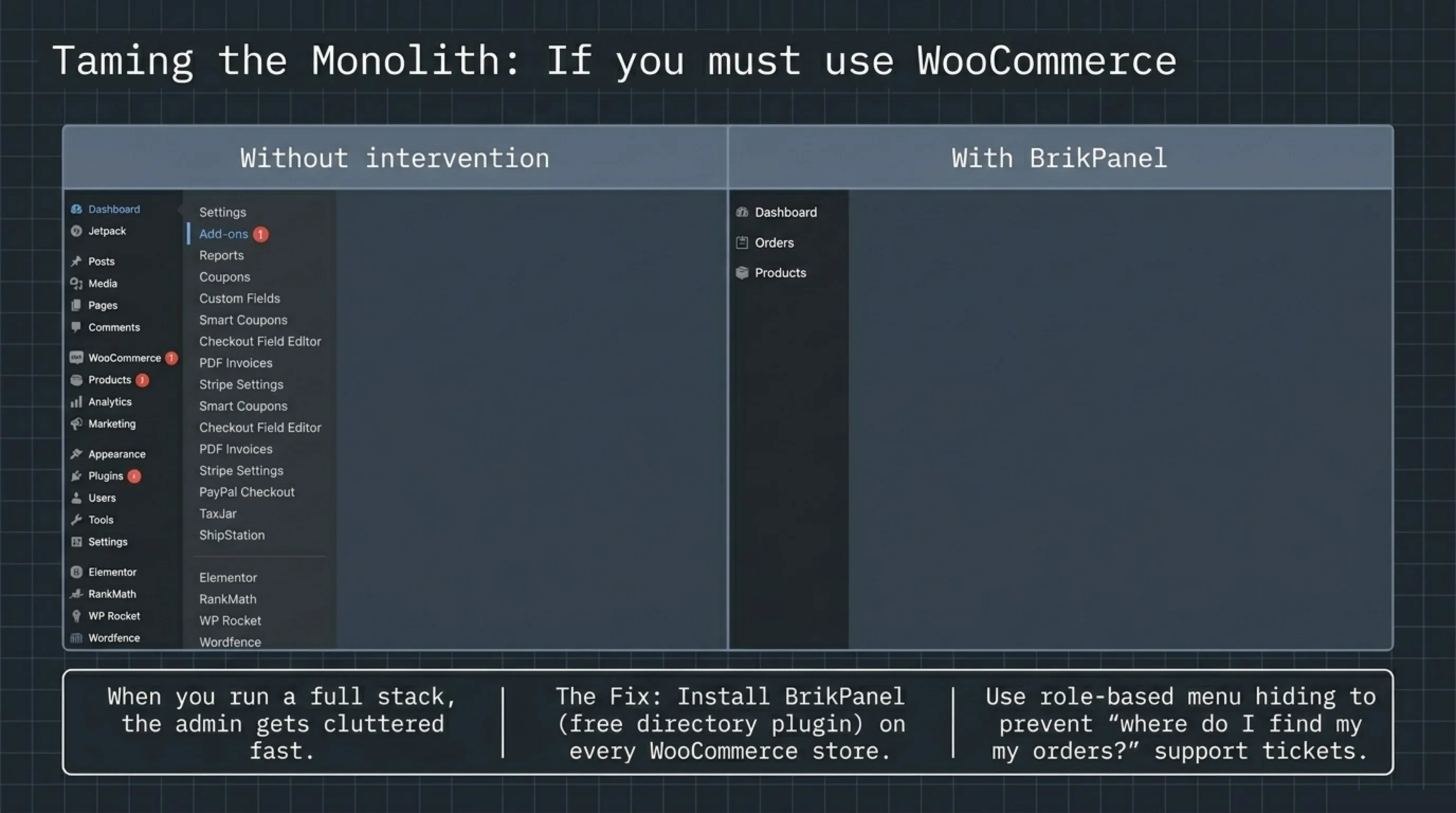
A lightweight alternative is also free at the plugin level, with a smaller stack underneath. That is the math, not “free vs paid”. The real question is which free thing matches your store shape. For a 4-PDF meditation site, WP Simple Pay’s free button is a better answer than WooCommerce’s free plugin. For a real WooCommerce store on the other side of that line, BrikPanel is the free admin-cleanup plugin I install on top to keep the dashboard from drowning in 30 plugin menus.
FAQ
About BrikPanel. BrikPanel is a free WordPress plugin that cleans up the admin: hide menu items per user role, customize dashboard widgets, give clients a focused login experience without the visual clutter of 30 plugin menus. If you are weighing how can i sell on wordpress without woocommerce against running a full WooCommerce stack, BrikPanel is the tool that keeps the WooCommerce side workable when the answer turns out to be WooCommerce after all. Install it from the directory; no premium tier on the role-based menu hiding feature.
Deactivate WooCommerce, then install WP Simple Pay or Easy Digital Downloads instead. Before you do, export your orders and customers, because once WooCommerce is gone, the data lives in tables that the new plugin will not read. The cleanest path is to stand up a staging site, install the alternative, recreate your products there, redirect old WooCommerce URLs (/shop, /cart, /checkout) to the new pages, and only then swap. Took me four hours on the meditation app rebuild and zero traffic was lost in the two weeks after the swap.
WordPress is the underlying CMS that runs your site; WooCommerce is one of thousands of plugins you can add to WordPress, specifically the one that turns it into a full ecommerce store with cart, checkout, products, and orders. You can run WordPress without WooCommerce, you cannot run WooCommerce without WordPress.
The WooCommerce plugin is free. There are no platform transaction fees on top of your processor rate. What costs money sits around it: hosting, premium extensions like Subscriptions ($239/yr) or Bookings, and your time. So if the question how can i sell on wordpress without woocommerce was driven by cost, run the actual numbers, because for many small stores a free WP Simple Pay setup is genuinely cheaper than a free WooCommerce setup once the hosting tier is factored in.
Because the moment you need shipping zones, mixed physical/digital carts, customer accounts with order history, or 100+ SKUs, the simpler tools start fighting you. WooCommerce is the right shape for stores that look like real stores. The simpler tools are right for product pages with a buy button, not for catalogs with operational complexity.
You can, but you will fight the toolchain. WP Simple Pay does not handle shipping rates. EDD is digital-only by design. SureCart is the closest “physical without WooCommerce” option I have used in production, and it works for 1-20 SKUs without weight-based shipping. Past that line, install WooCommerce.
Only if you do not redirect the old WooCommerce URLs. Set up 301s from /shop, /product/*, /cart, and /checkout to the new pages, keep the same product slugs where possible, and your rankings carry over. I have done this six times across client sites without measurable traffic loss past the first two weeks.
Sources Used
- wordpress.org/plugins/easy-digital-downloads — confirmed Easy Digital Downloads is a free WordPress plugin in the official directory, used for Path 2.
- wordpress.org/plugins/stripe — verified WP Simple Pay’s official directory listing as the Stripe payment buttons plugin used in Path 1.
- wordpress.org/plugins/woocommerce — referenced for the WooCommerce plugin’s GPL-licensed availability and the table footprint baseline.
- stripe.com/docs/payments/checkout — used for the Stripe Checkout redirect flow recommended on the WP Simple Pay path.
- stripe.com/pricing — sourced the 2.9% + $0.30 per US card transaction rate referenced in the comparison table.
- woocommerce.com/products/woocommerce-subscriptions — pulled the $239/yr official Subscriptions extension price for the cost comparison.
- easydigitaldownloads.com — referenced for Easy Digital Downloads’ premium extension listings beyond the free core plugin.
- woocommerce.com — referenced for the broader WooCommerce extension catalog cited in the “why use woocommerce” section.
- wordpress.org/plugins/brikpanel-admin-panel-dashboard-for-woocommerce — link to install BrikPanel for admin cleanup on WooCommerce stores that grow past the lightweight options.
