
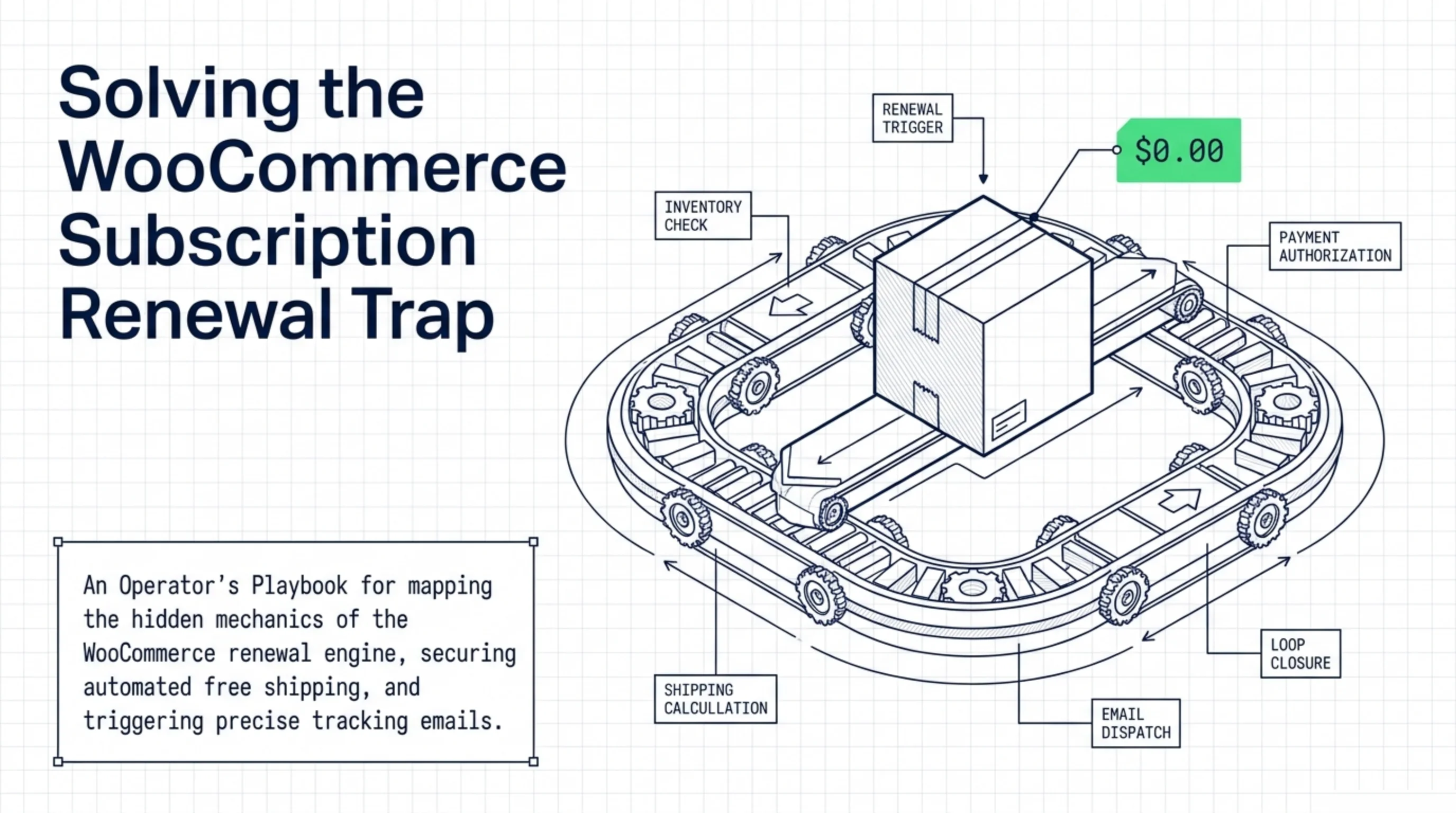
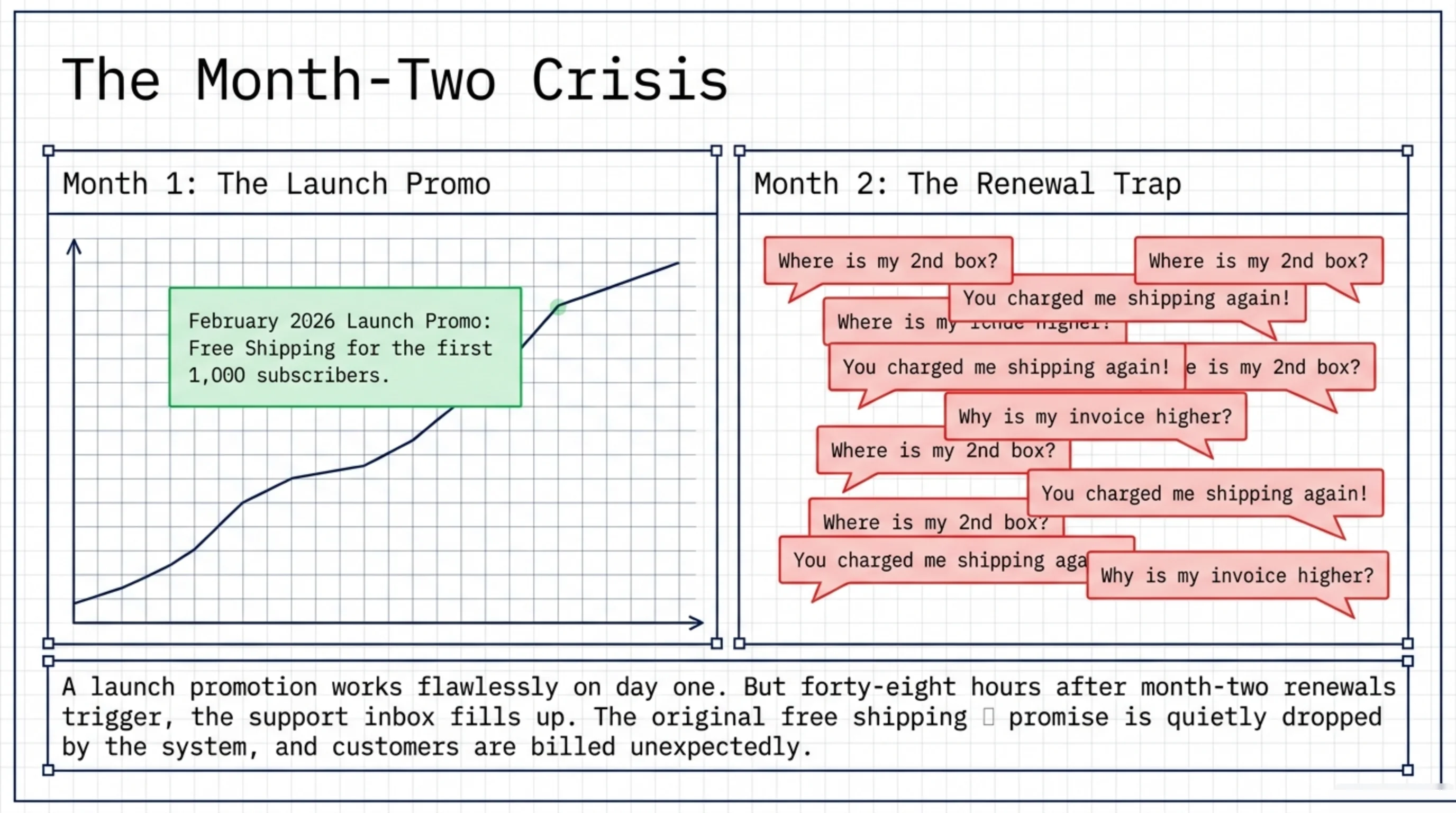
A subscription coffee brand launched in February 2026 with a “free shipping for the first 1,000 subscribers” promo. The launch worked. Forty-eight hours later their support inbox filled with “where is my second box, you charged me shipping again.” How do I enable free shipping with WooCommerce Subscriptions across the entire life of the subscription is the question their setup did not answer. The native free-shipping flag on a WooCommerce coupon applies to the parent order only. Every renewal generates a fresh order with its own shipping calculation, the original promise quietly drops, and the support tickets land at month two. This article is the version I wrote for that client, and four others I have done it for since.
How Do I Enable Free Shipping With WooCommerce Subscriptions: The Renewal Trap First
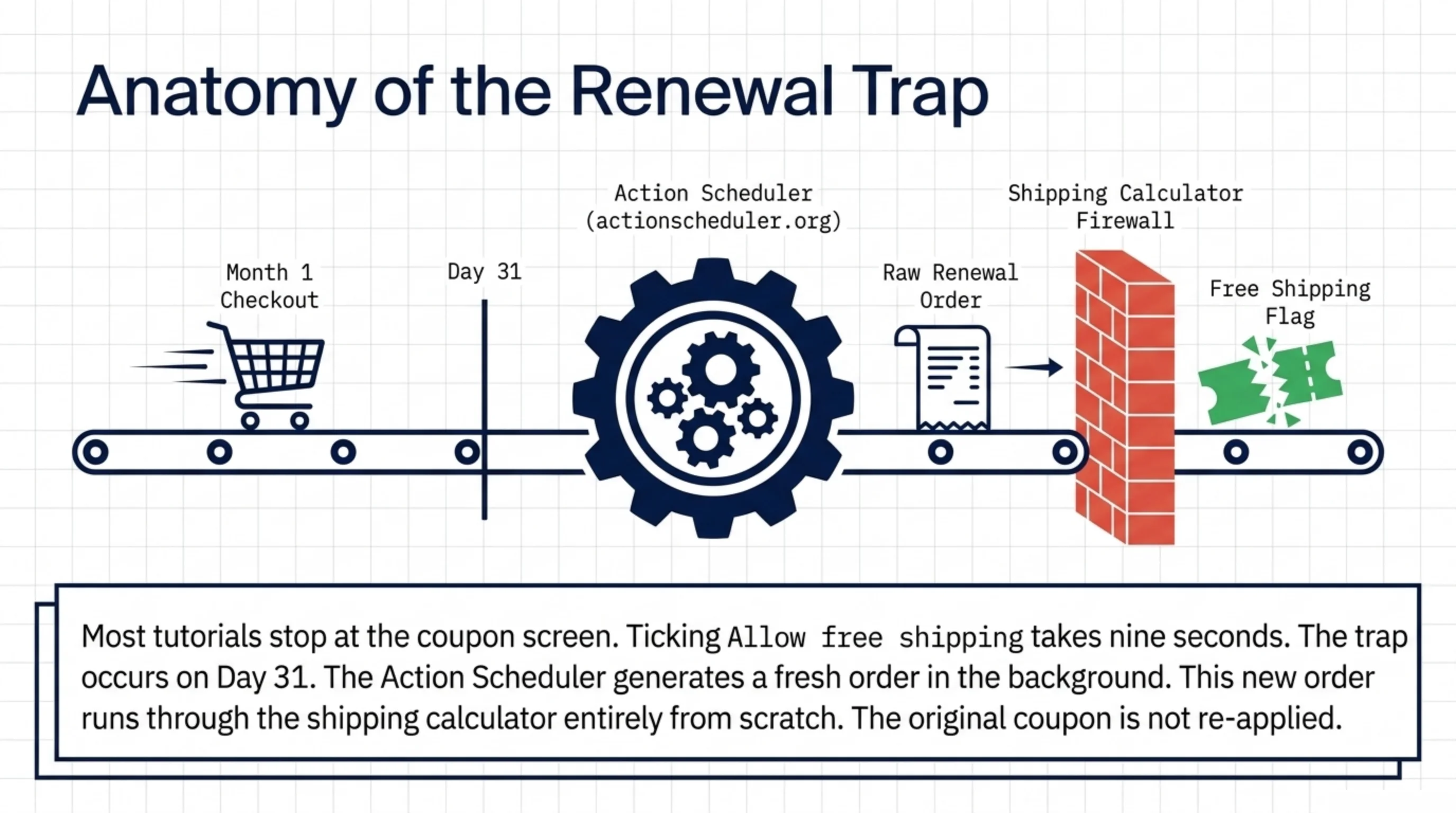
Most tutorials answering how do I enable free shipping with WooCommerce Subscriptions stop at the coupon screen. The screen does the easy part: tick “Allow free shipping”, save. Done in nine seconds. The hard part is what happens on day 31, when the subscription renews and the new order is created in the background by Action Scheduler (actionscheduler.org). That order runs through the shipping calculator from scratch, the original coupon is not re-applied, and the customer is charged.
The operator-side implication is one sentence: regular WooCommerce coupons do not survive the renewal cycle. So before answering how do I enable free shipping with WooCommerce Subscriptions, you have to know which coupon types get copied forward. The Subscriptions extension (woocommerce.com/products/woocommerce-subscriptions) supports two coupon types core does not: “Recurring product discount” (fixed) and “Recurring product % discount”. Either one keeps its free-shipping flag across every renewal. Every other coupon type drops it. The fix to how do I enable free shipping with WooCommerce Subscriptions is using one of those two types as a vehicle for the flag, not as an actual discount. The class hierarchy is in the source repo at github.com/woocommerce/woocommerce if you want to read the renewal-order generation code.
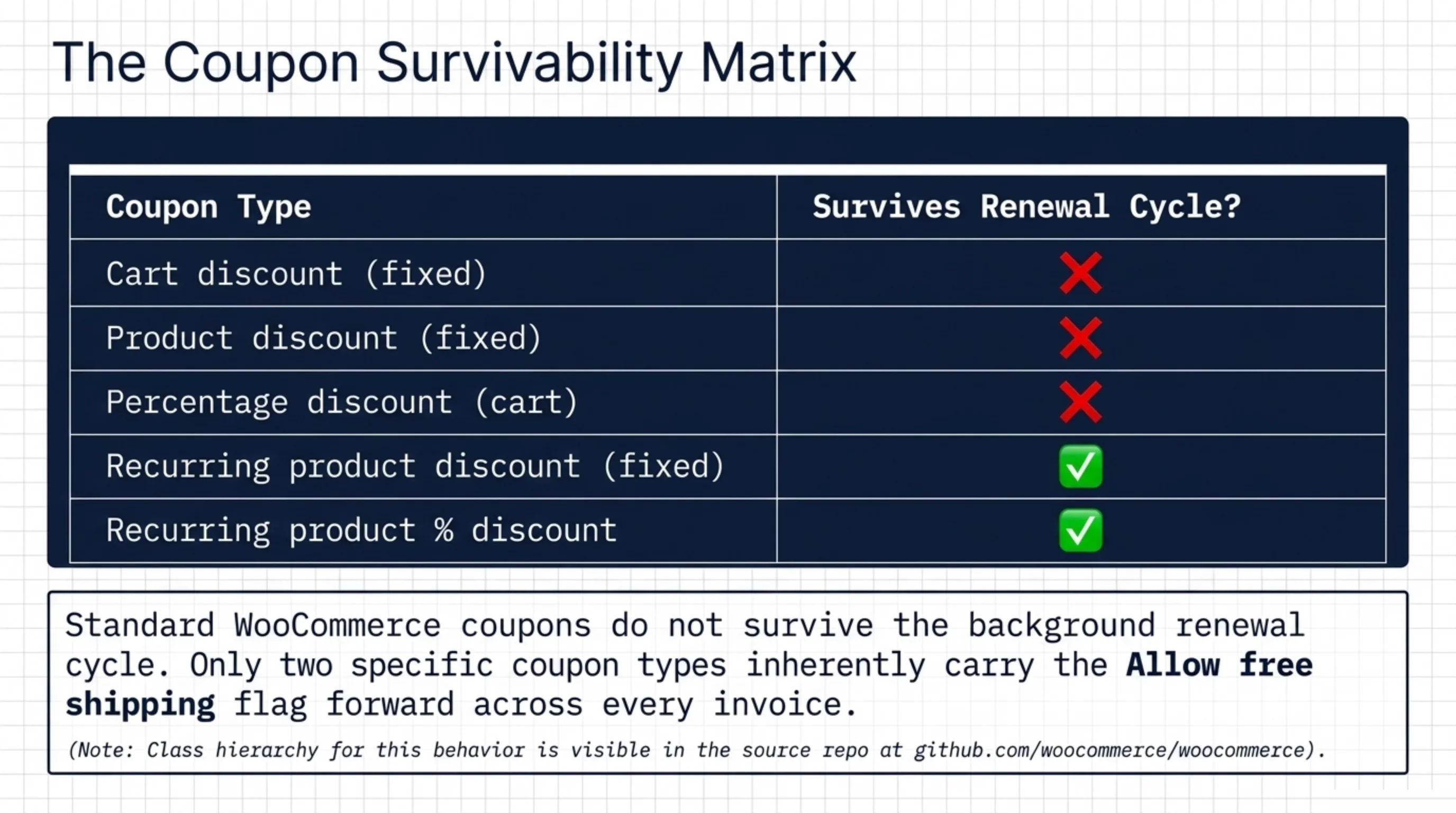
| Coupon type | Free shipping flag survives renewal? |
|---|---|
| Cart discount (fixed) | No |
| Product discount (fixed) | No |
| Percentage discount (cart) | No |
| Recurring product discount (fixed) | Yes |
| Recurring product % discount | Yes |
The two yes-rows above are the only configurations that work. Memorize them.
How to Set Up Shipping in WooCommerce Before You Enable Free Shipping with WooCommerce Subscriptions
You cannot skip this step. The supporting question of how to set up shipping in WooCommerce is a prerequisite to any subscription rule, and most stores I audit have the foundation half-built. The official setup guide at woocommerce.com/document/woocommerce-shipping walks the screens. Here is the configuration order I use on every new store.
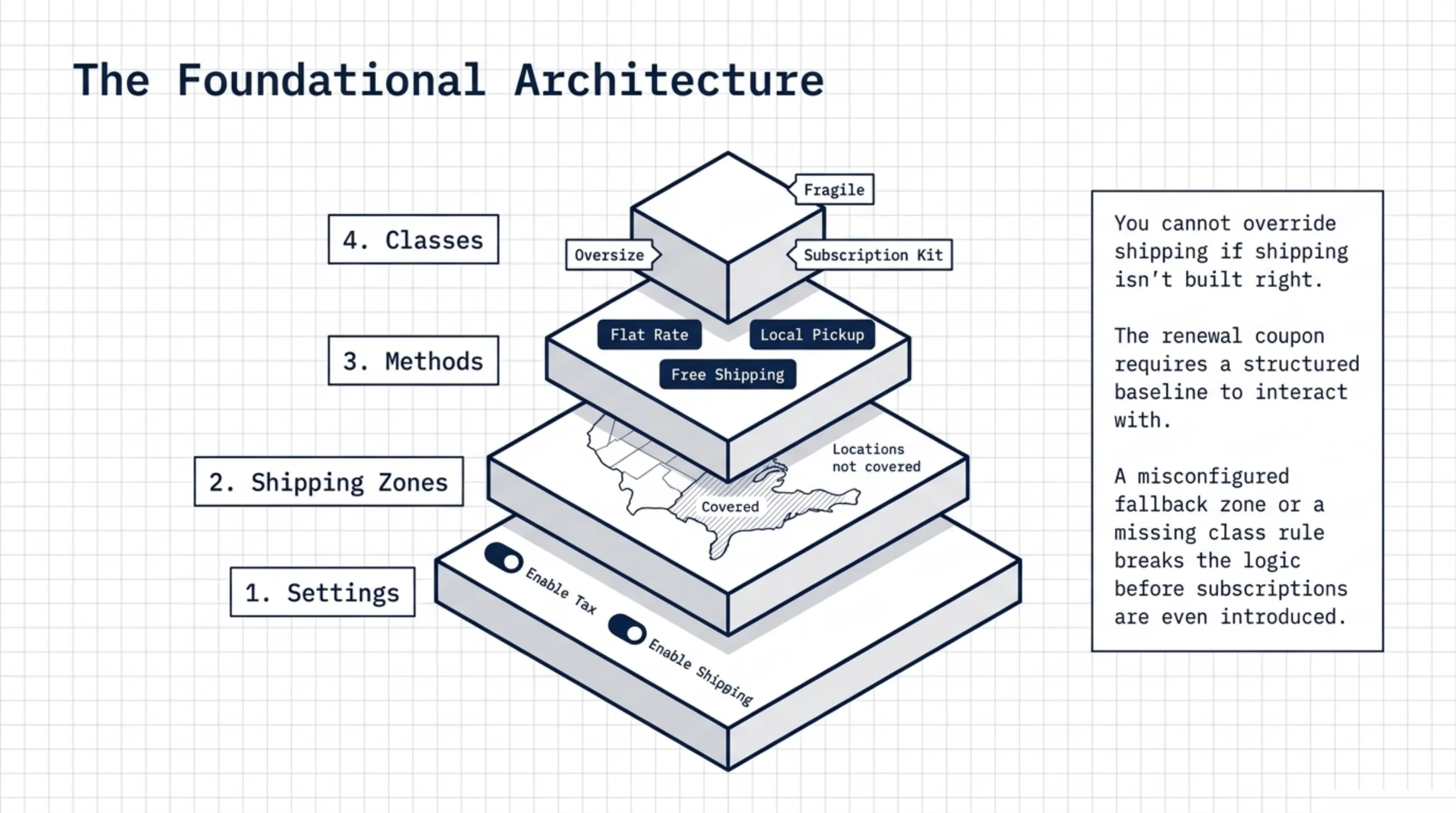
- Enable shipping in WooCommerce → Settings → General. The tax-and-shipping dropdowns at the bottom both have to be set or the calculator skips silently.
- Define shipping zones in WooCommerce → Settings → Shipping → Shipping zones, per the zones documentation (woocommerce.com/document/setting-up-shipping-zones). One zone per country-group you fulfill to. The “Locations not covered” zone is your fallback; do not leave methods enabled on it unless you genuinely accept orders from anywhere.
- Inside each zone, add shipping methods: Flat rate, Free shipping, Local pickup. The Free shipping method here is not the free-shipping coupon flag covered later. This one applies to the whole zone unconditionally or with a minimum-order threshold. The two get confused in support tickets weekly.
- Add shipping classes for product groupings that price differently (woocommerce.com/document/shipping-classes). I use them for “oversize”, “fragile”, and “subscription kit” almost universally. Class-based rates inside Flat rate methods is how you avoid “all products ship for $5 even when one is a 30lb crate.”
- Save. Load a product page in incognito with a US ZIP and a non-US ZIP and confirm the calculator shows the rates you expect. If it does not, your zone matching is misconfigured before you ever get to subscriptions.
This is the foundation under any answer to how do I enable free shipping with WooCommerce Subscriptions. Without zones and classes, the renewal coupon has nothing sensible to override.
How to Show Shipping Options in WooCommerce That Match the Subscription Cart
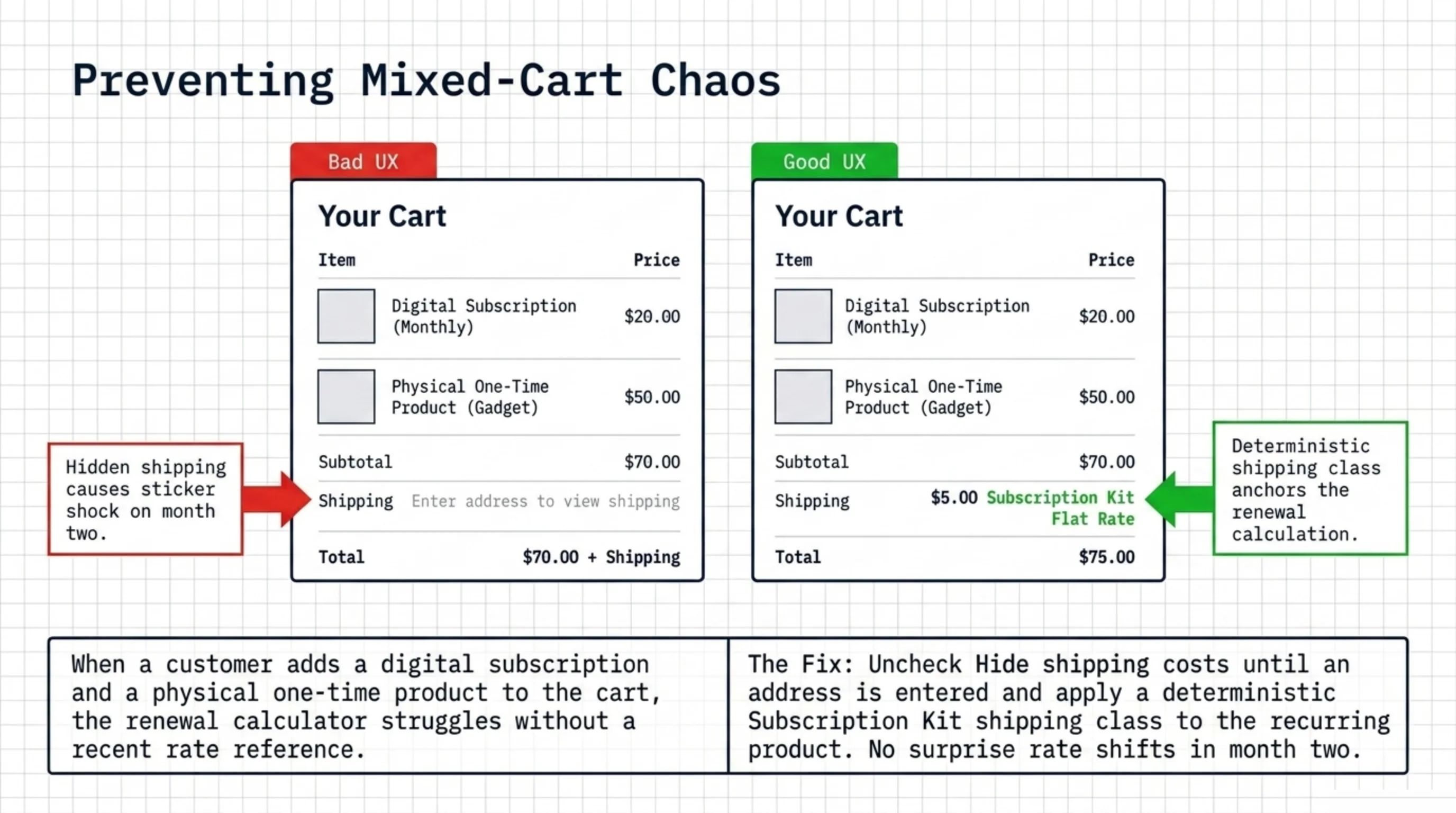
How to show shipping options in WooCommerce on cart and checkout is mostly handled by the calculator running automatically once an address is entered. What breaks on subscription stores is option visibility per cart contents.
A subscription product can have shipping required (physical goods shipped on each renewal) or shipping not required (digital). Mixed carts are where it gets ugly. If a customer adds a coffee subscription and a one-time eBook, the checkout shows shipping options, the customer pays once, and the renewal creates a shipping-required order with no recent rate to reference. The calculator runs again and picks the cheapest available method by default. That default is rarely what the customer expected.
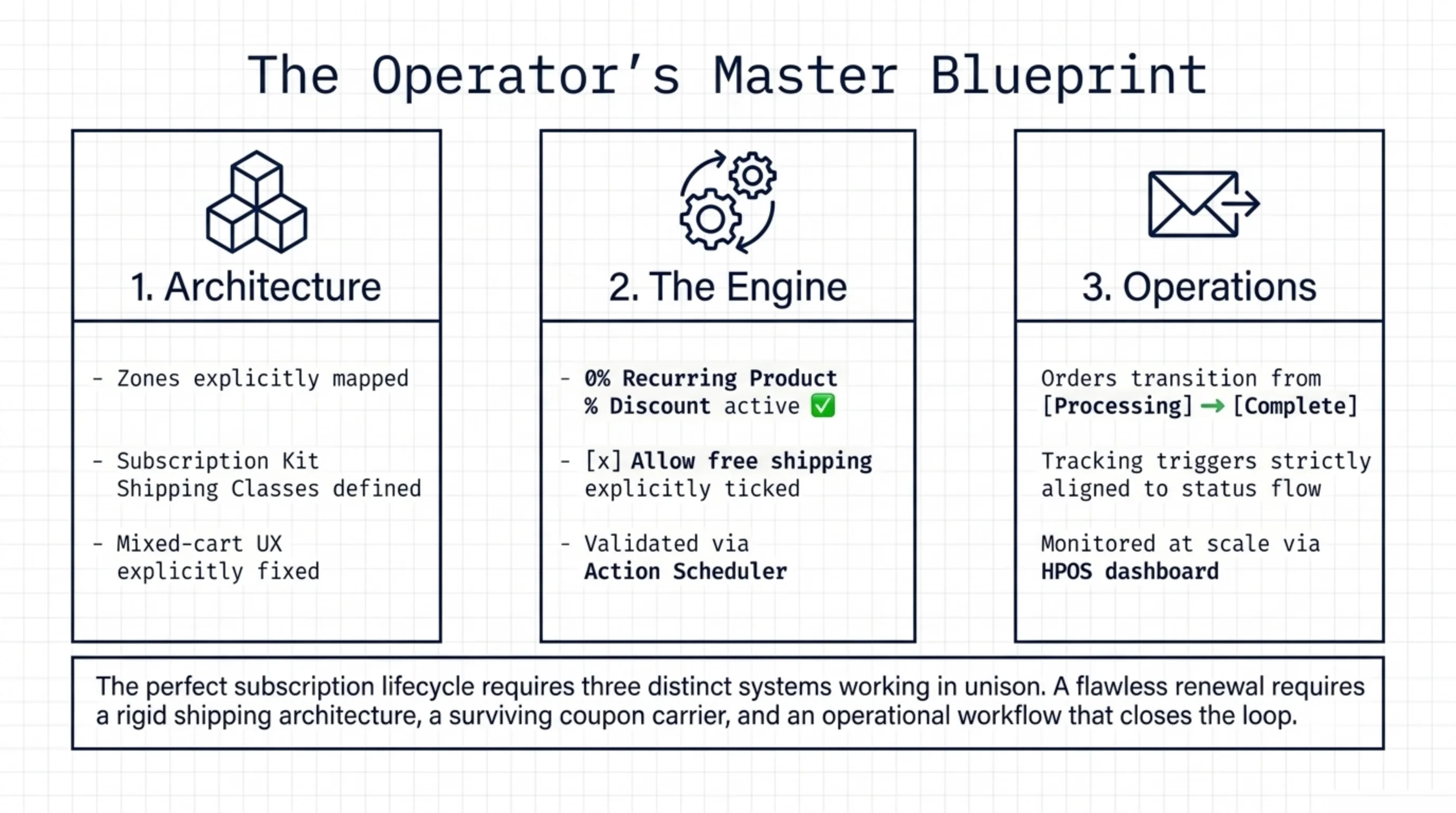
The fix is two-part: – Set “Hide shipping costs until an address is entered” off in WooCommerce → Settings → Shipping → Shipping options. I want the shipping line visible the moment a product is in the cart. – Use a “subscription kit” shipping class on the recurring product. The class-specific Flat rate forces a deterministic price the renewal calculator will reproduce. No surprise rate shifts in month two.
How do I enable free shipping with WooCommerce Subscriptions for the recurring kit specifically? Not with the zone-level Free shipping method, which is unconditional and would free-ship any one-time orders into the zone. The right path is the next section.
How Give Customer Free Shipping Coupon for Subscription in WooCommerce: The 0% Recurring Trick
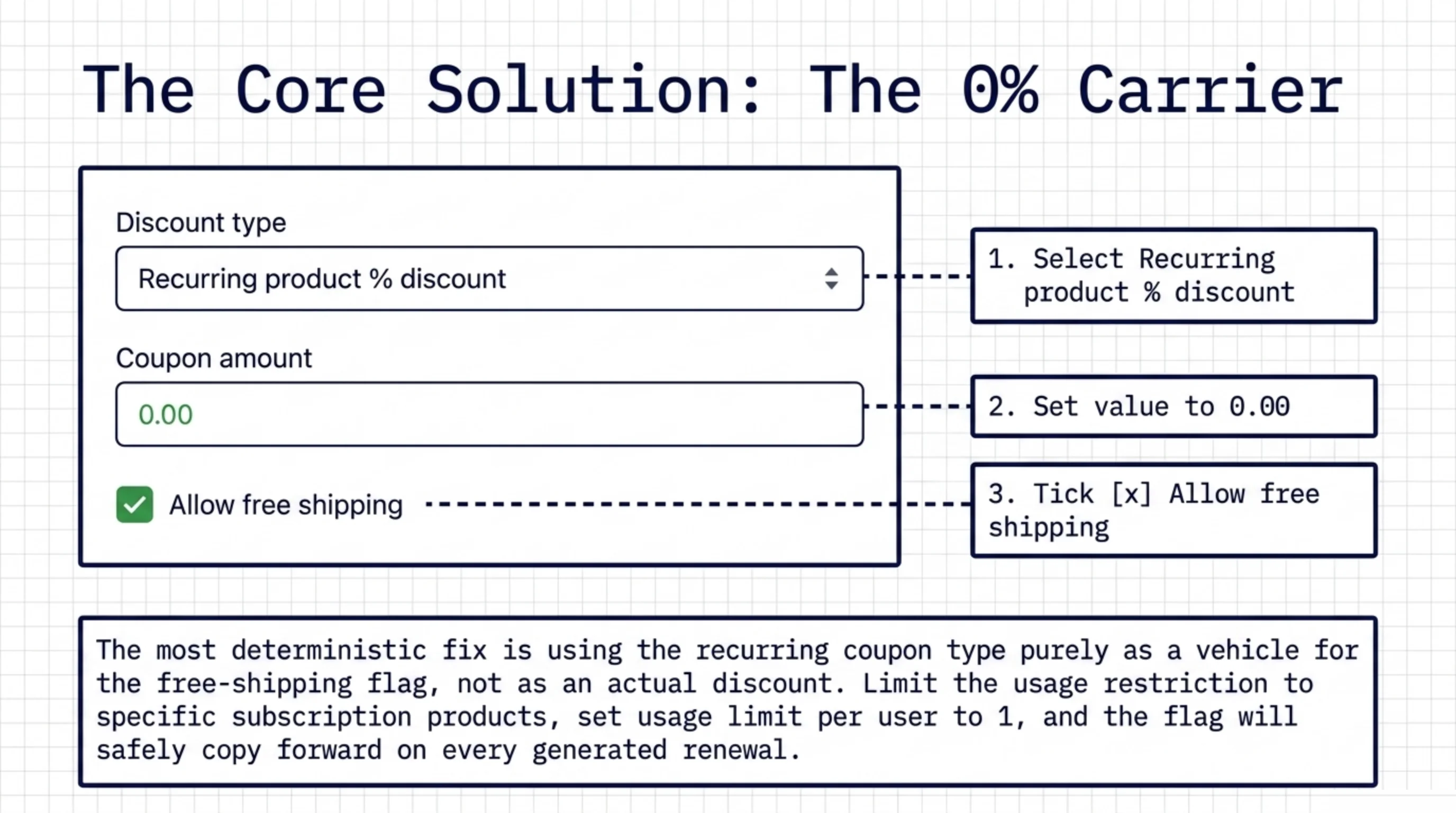
This is the actual mechanism. The supporting keyword how give customer free shipping coupon for subscription in WooCommerce reads awkwardly because it is search-shaped. The configuration is awkward too, but it is the one path that survives renewals.
Steps, exactly:
- Marketing → Coupons → Add coupon.
- Discount type: Recurring product % discount. This type ships only with the WooCommerce Subscriptions extension installed (woocommerce.com/products/woocommerce-subscriptions).
- Coupon amount: 0.00. You are not discounting the product; you are using this coupon type as a carrier for the free-shipping flag.
- Tick Allow free shipping. This is the flag Subscriptions copies forward on every renewal it generates.
- Usage restriction → Products: select the subscription product(s) the offer applies to. Leaving this empty silently free-ships every subscription cart that matches.
- Usage limits → Usage limit per user: 1.
- Save. Distribute the code through the signup flow, the post-checkout email, or a direct URL parameter that auto-applies it.
That is how give customer free shipping coupon for subscription in WooCommerce in a way that does not silently drop on the second invoice.
A pet peeve. The Subscriptions documentation as of early 2026 still does not put this pattern on the same page as the coupon types reference. I have rewritten the runbook for three clients in the last six months because their support team kept manually applying renewal credits one at a time. The 0% recurring coupon is the unsexy fix, and it shipped six years ago.
The validation step nobody runs: in WooCommerce → Status → Action Scheduler, find the next woocommerce_scheduled_subscription_payment job and run it. The renewal order is created immediately. Confirm the shipping line shows $0.00 and the coupon code appears on the order metadata. If it does not, the coupon type is wrong or the product restriction does not include the renewal’s product. The patch is ugly. It works.
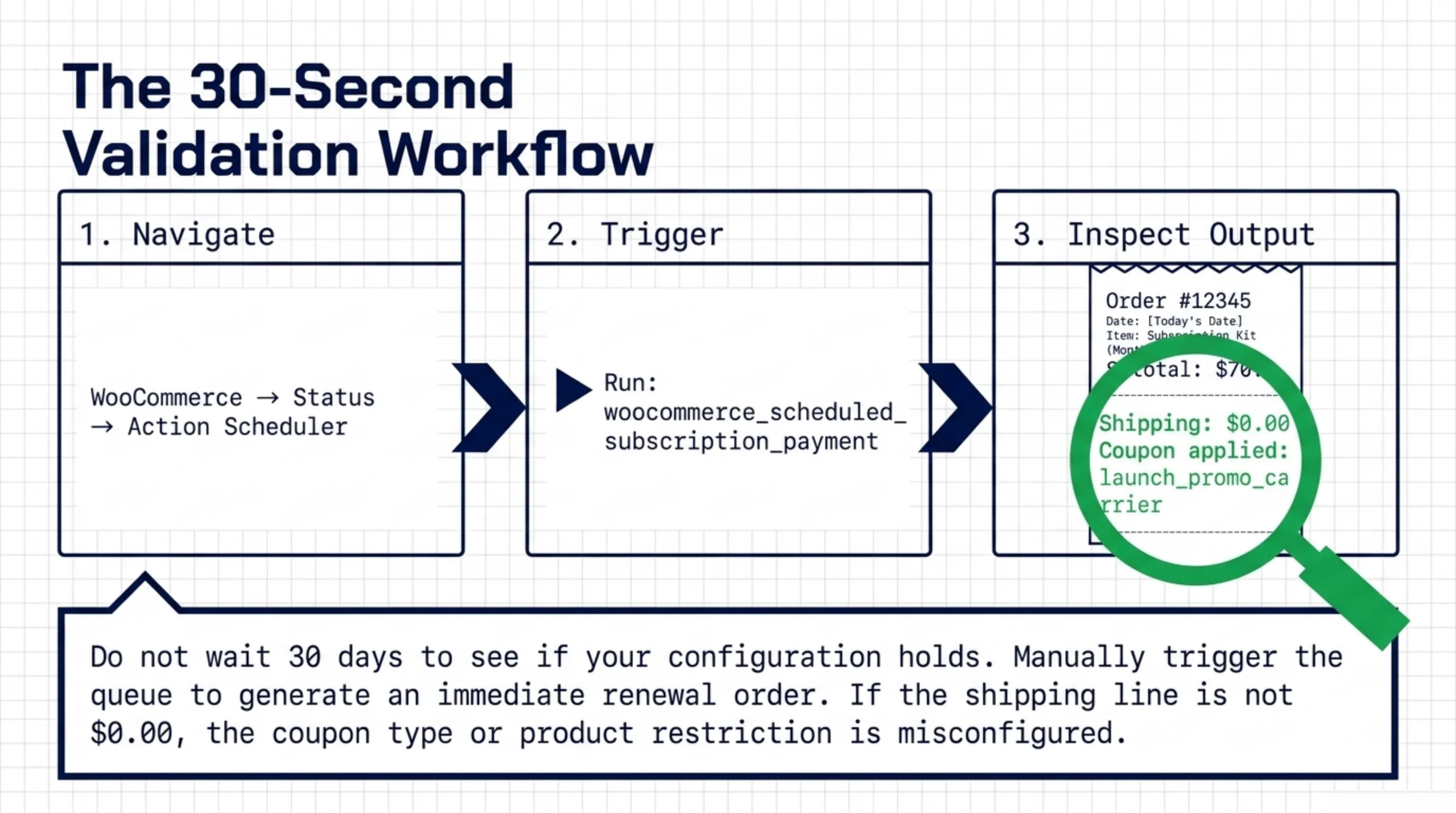
When somebody pings me on Slack asking how do I enable free shipping with WooCommerce Subscriptions, my answer is three lines: 0% recurring product percent discount, allow free shipping, restrict to the right products. Then run a test renewal.
Enable Free Shipping with WooCommerce Subscriptions for One Tier Only
A common follow-up. The store has three subscription tiers, Bronze, Silver, Gold, and the offer is “free shipping for Gold subscribers, paid shipping for Bronze and Silver.” The single-coupon path does not handle this cleanly because a coupon is opt-in. The renewal needs the rule to apply automatically and forever.
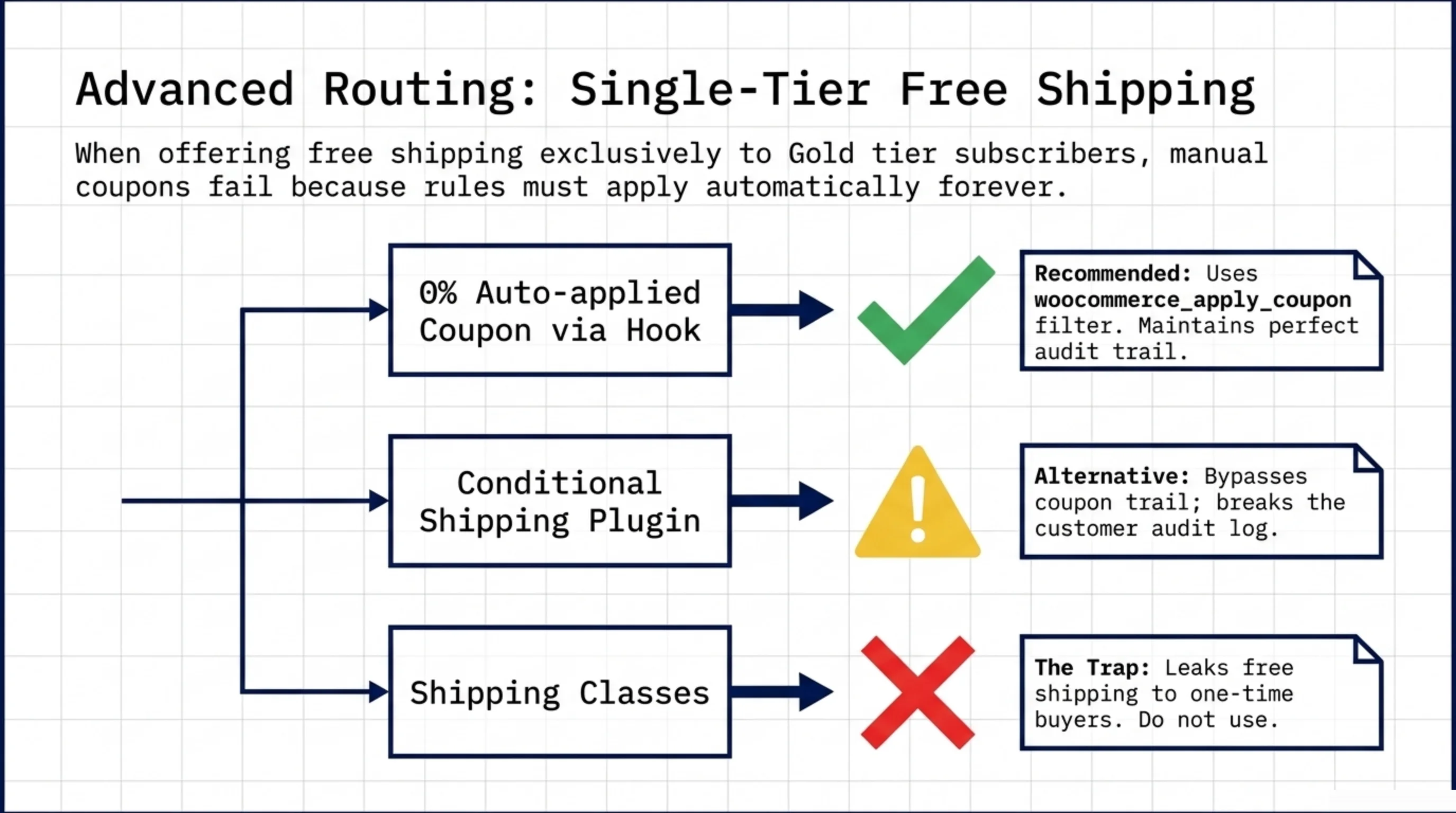
Two real options.
Option 1: One coupon per tier, auto-applied at signup. Create a 0%-recurring-percent coupon restricted to the Gold product. Use a small filter on the woocommerce_apply_coupon hook to apply it automatically when the cart contains that product. The Subscriptions extension copies it forward, the renewal ships free, the rule survives. Code lives in a child theme functions file or a tiny mu-plugin.
Option 2: Conditional shipping methods plugin. Paid extensions add per-product or per-class conditions to shipping methods themselves. I use these less often because they bypass the coupon trail, which makes the “why did this customer get free shipping” audit harder to reconstruct. Coupons leave a record on the order; conditional shipping methods do not unless the plugin opts in to logging.
The shipping-class lever is the third option I almost never recommend. Put the Gold product in a “free-ship” class, set the class rate to 0 on the zone Flat rate method, and it works. It also leaks free shipping to anybody who one-time-buys a Gold-tier product, because the class rule does not know recurring from non-recurring. So the answer to how do I enable free shipping with WooCommerce Subscriptions for one tier specifically is the recurring coupon path, not the class path, on every store I have shipped.
How Send Automatically Send Shipment Tracking Email WooCommerce After Each Renewal
Free shipping survives the renewal. Done. The next thing the customer wants is the tracking number. The supporting keyword how send automatically send shipment tracking email WooCommerce is grammatically broken, but the job is real: an automated email when each renewal box ships, with the carrier and tracking number.
Three real implementations, in increasing order of ugliness.
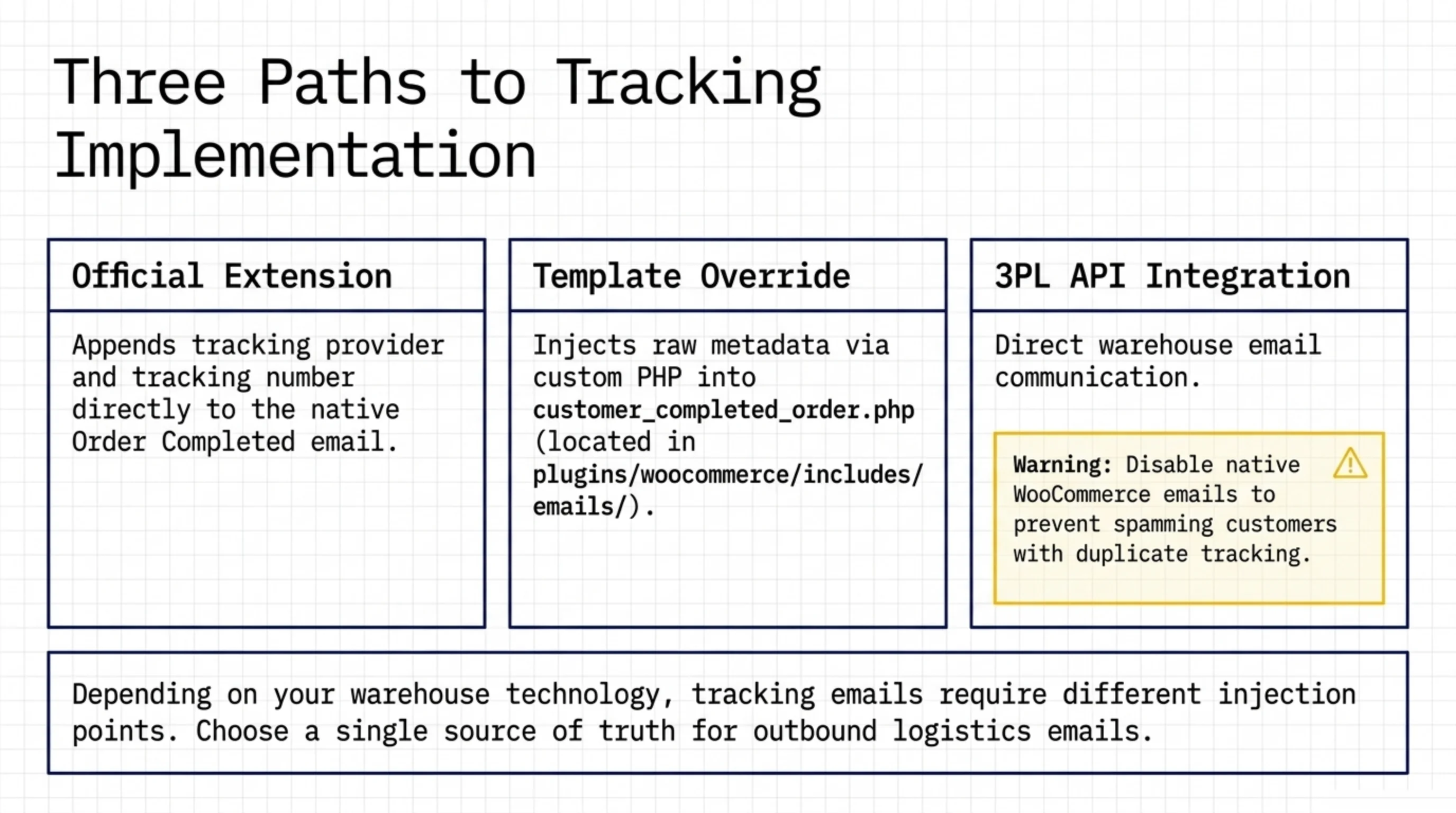
Shipment Tracking extension (official). Adds tracking provider, number, and shipment date as fields on the order admin screen. Fires woocommerce_order_status_completed with the tracking info when you mark an order Complete. Documented at woocommerce.com/document/woocommerce-shipment-tracking. It does not auto-send a separate “your package shipped” email; it appends tracking info to the Order Completed email. For most stores that is fine.
Email template override. Override the customer_completed_order template at woocommerce/emails/customer-completed-order.php and inject the tracking metadata into the body. The email classes live in the source repo under plugins/woocommerce/includes/emails/. A custom class extending WC_Email works, but template override has fewer moving parts.
3PL or carrier API integration. For warehouses where the 3PL emails directly, do not also have WooCommerce email tracking enabled. Pick one source and disable the other. I have seen customers receive three tracking emails for one shipment from three systems trying to be helpful. That is worse than no email at all.
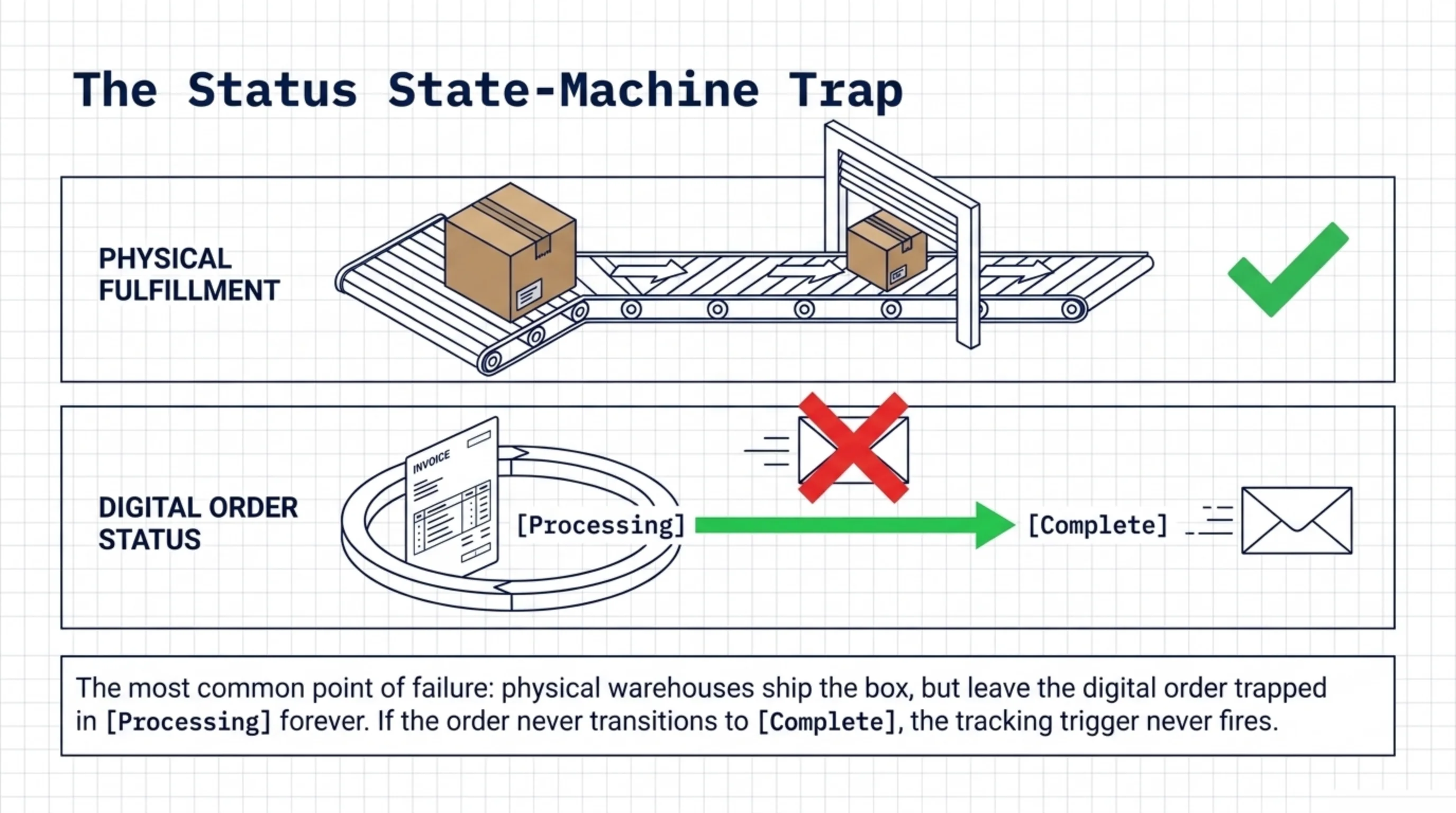
The renewal-specific concern is how send automatically send shipment tracking email WooCommerce on every renewal, not just the signup. The Subscriptions extension generates each renewal order with the same status flow as a regular order. If your tracking workflow runs on woocommerce_order_status_completed, it fires automatically, as long as the order actually transitions to Complete. The trap I see most: warehouses that mark renewal orders as Processing forever and never flip them to Complete. The tracking email never fires. Audit your post-shipment status flow before assuming the automation works.
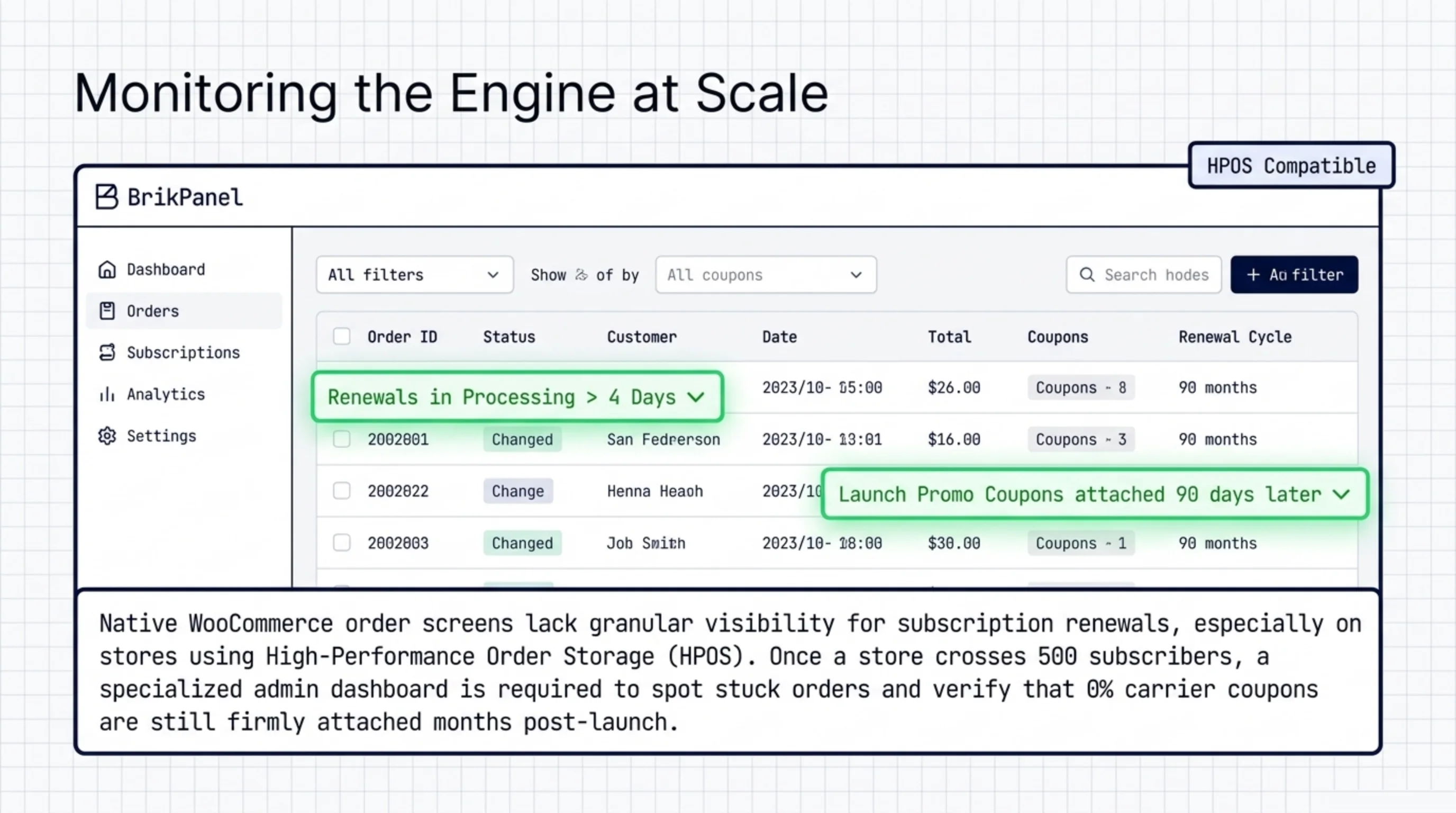
This is where a fulfillment-status dashboard pays for itself. The native orders screen does not filter for “subscription renewal orders sitting in Processing for more than 4 days.” That gap gets worse on stores moved to High-Performance Order Storage (woocommerce.com/document/high-performance-order-storage) where some third-party admin tools have not caught up to the new tables. BrikPanel’s order dashboard adds filters for subscription source and time-in-status that I lean on once a store crosses ~500 active subscribers (wordpress.org/plugins/brikpanel-admin-panel-dashboard-for-woocommerce). I also use it to spot-check that a launch-promo free-shipping coupon is still attached 90 days later.
The full answer to how do I enable free shipping with WooCommerce Subscriptions and have the tracking email fire on each renewal is two-part: recurring 0% coupon plus a status flow that actually transitions renewals to Complete. Both halves have to be right.
FAQ
The coupon type is wrong. Regular WooCommerce coupons set “Allow free shipping” on the parent order only; the flag is not copied forward when Subscriptions generates a renewal. Switch the coupon to “Recurring product % discount” at 0%, and the flag travels forward. This is the central answer to how do I enable free shipping with WooCommerce Subscriptions across the full subscription lifetime.
Yes, with the zone-level Free shipping method, but only if you want free shipping on every order in that zone, including one-time non-subscription purchases. Most stores want it scoped to subscribers; the recurring coupon path is the scoped solution.
The official Subscriptions extension is paid (woocommerce.com/products/woocommerce-subscriptions). The recurring coupon types live inside it. Free alternatives like Subscriptio or YITH WooCommerce Subscription have their own coupon and shipping handling; do not assume the same flags exist or behave identically. Test signup and a manually-triggered renewal before launch.
The tracking email is bound to the status transition your workflow listens to, usually woocommerce_order_status_completed. If renewals sit in Processing forever, the email never fires. Either flip your tracking trigger to fire on Processing, or fix the warehouse process that should be marking orders Complete. The first is faster, the second is more correct.
In WooCommerce → Status → Action Scheduler, find the next woocommerce_scheduled_subscription_payment job and run it manually. The renewal is created immediately. Verify the shipping line is $0.00 and the coupon is on the order. If either is missing, the coupon type, product restriction, or “Allow free shipping” flag is misconfigured.
Sources Used
- woocommerce.com/document/woocommerce-shipping — cited for standard shipping setup screens and configuration order.
- woocommerce.com/document/setting-up-shipping-zones — cited for shipping zone definitions and the fallback zone behavior.
- woocommerce.com/document/shipping-classes — cited for shipping class configuration used to scope rates per product group.
- woocommerce.com/products/woocommerce-subscriptions — cited for the Subscriptions extension and its recurring coupon types.
- woocommerce.com/document/woocommerce-shipment-tracking — cited for the official Shipment Tracking extension.
- github.com/woocommerce/woocommerce — cited for the email class location used when overriding completion emails.
- actionscheduler.org — cited for the queue that runs subscription renewal jobs.
- woocommerce.com/document/high-performance-order-storage — cited for HPOS impact on admin dashboard compatibility.
- wordpress.org/plugins/brikpanel-admin-panel-dashboard-for-woocommerce — cited as the install location for BrikPanel.
BrikPanel: Order Dashboard for Subscription Stores BrikPanel is a free WordPress admin plugin that adds an order dashboard with filters for subscription source, attached coupons, and time-in-status, so you can see which renewals are sitting in Processing and which subscriptions still have a free-shipping coupon attached. If you are working through how do I enable free shipping with WooCommerce Subscriptions and want to confirm the promise still holds 90 days post-launch, install free from wordpress.org/plugins/brikpanel-admin-panel-dashboard-for-woocommerce and start with the order dashboard view.
